Articles
Your Ultimate Business Receipt Organizer Workflow
A business receipt organizer is essentially a smart system designed to automatically grab, sort, and file away all your company’s purchase records. The best ones will fetch digital invoices right from your email or supplier portals, give you a mobile app to snap photos of paper receipts, and then use AI to pull out all the important details. The whole point is to ditch the manual data entry and have everything ready for tax time, no sweat.
The True Cost of Disorganized Receipts
We all know the cliché: the shoebox overflowing with crumpled receipts. But that chaotic inbox and stack of paper isn't just a mess—it’s a silent drain on your business's finances. Sticking with old-school manual methods creates hidden costs that are about way more than just wasted time. It's a vicious cycle of expensive human errors, that nail-biting stress come tax season, and completely missed opportunities to understand your own spending.
Let's be real, we've all been there. The hours spent squinting at faded receipts and typing numbers into a spreadsheet are bad enough. But the real damage runs much, much deeper.
Before you can make smart decisions, you need a clear picture of your finances. Let's take a look at how manual receipt tracking compares to an automated system.
Manual Vs Automated Receipt Organization
Here's a quick look at how switching to an automated business receipt organizer changes the game for your daily workflow and bottom line.
Feature
Manual Process
Automated System (e.g., Booksmate)
Receipt Capture
Physically collecting paper, forwarding emails one by one.
Auto-fetches from email/portals, mobile app for paper snaps.
Data Entry
Someone has to manually type in vendor, date, total, tax.
AI extracts all key data automatically.
Error Rate
High. Typos and missed receipts are common.
Extremely low. Reduces data entry errors by up to 90%.
Time Spent
Significant. Wastes up to 20-30% of a finance person's time.
Minimal. A few clicks to review and approve.
Audit Readiness
A frantic, stressful scramble to find documents.
Always ready. All documents are digitized, categorized, and searchable.
Financial Insight
Delayed and often inaccurate. Decisions are based on old data.
Real-time. See spending as it happens to make better decisions.
As you can see, the difference isn't just about saving a little time. It's about building a more resilient, efficient, and intelligent financial operation from the ground up.
The Ripple Effect of Manual Methods
When your receipts are a jumbled mess, you're flying blind. You’re forced to make crucial business decisions with your gut instead of with accurate, up-to-the-minute data. Can you actually afford that new piece of equipment? Is that marketing campaign paying off? Without organized expenses, you’re just guessing.
This lack of clarity snowballs into bigger problems:
- Lost Tax Deductions: Every faded, lost, or uncategorized receipt is money you're leaving on the table. Those missed deductions are a direct hit to your profit.
- Audit Anxiety: For many business owners, the fear of an IRS audit is a constant source of stress. A messy system turns a simple request for documents into a frantic, weekend-long treasure hunt.
- Wasted Brainpower: Manually processing every single receipt eats up valuable time—time that you and your team could be spending on work that actually grows the business.
The bottom line is that handling receipts by hand isn't just inefficient; it's a huge financial liability. It’s no surprise that a smart business receipt organizer can slash data entry mistakes by as much as 90%.
A Smarter Path Forward
The good news? There’s a clear way out of the chaos. The global market for receipt and expense management software is booming—valued at around $12.12 billion in 2024—and for good reason.
Businesses are finally waking up to the incredible value of automation. By bringing in the right tools, you can finally get organized, win back your time, and build the solid financial foundation you need to grow. You can explore more on the rapid adoption of these tools in recent market analysis to see just how fast things are changing.
Building Your Automatic Receipt Capture System
Alright, this is where we get to the good stuff. The core of a truly great business receipt organizer is getting it to capture every single expense document automatically, right when it’s created. The goal here is simple: to completely eliminate that frantic, end-of-month paper chase and make sure you never miss a potential tax deduction again.
We're going to build a system that acts like a wide net, pulling in receipts from every possible source. Think of it as a workflow that just hums along quietly in the background, so you can stop chasing down documents for good.
The difference between the old, manual way and a clean, automated system is night and day.
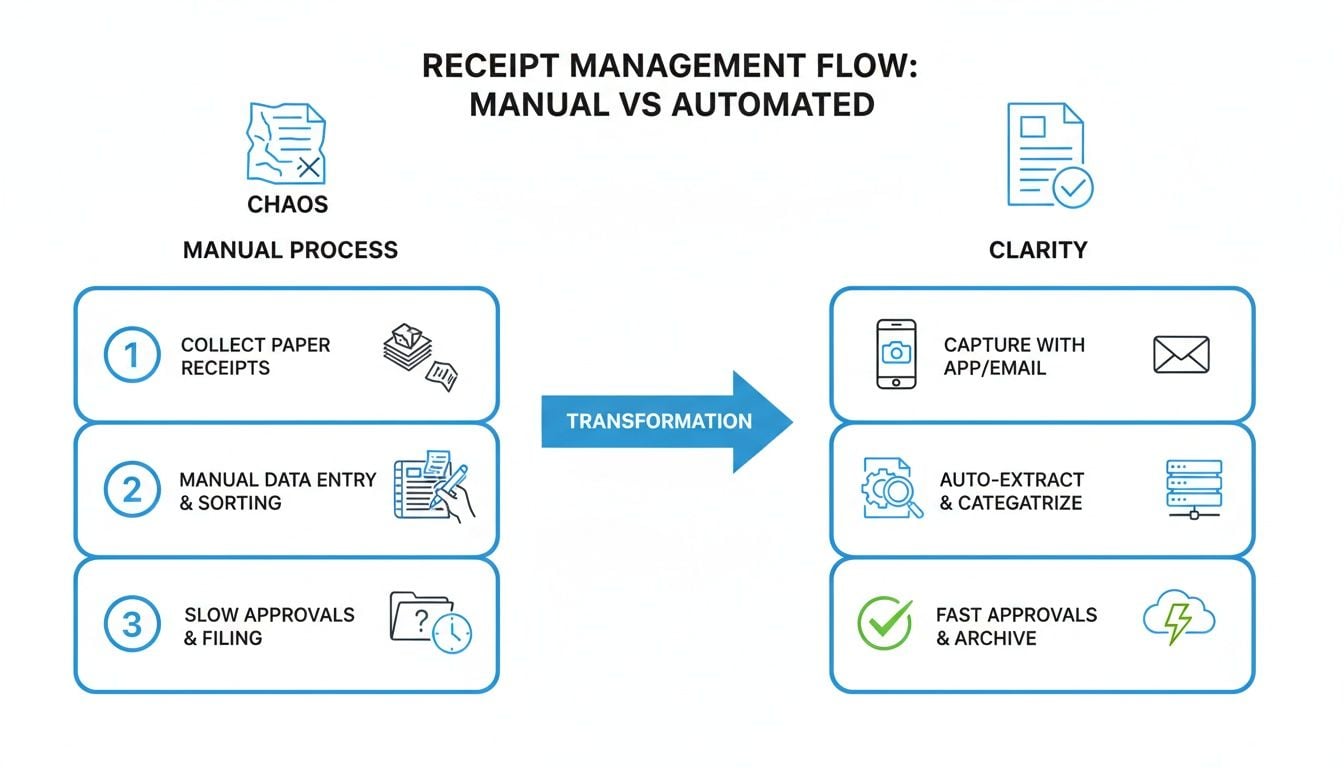
As you can see, automation takes you from disorganized chaos to a perfectly clear, searchable digital archive. It's all about bringing control back to your finances.
Hook Directly into Supplier Portals
Your first line of attack should be connecting your receipt organizer directly to the supplier portals you use most often. Let's be honest, a huge chunk of your recurring invoices probably comes from just a handful of places.
We’re talking about vendors like:
- E-commerce platforms: Amazon Business is a big one for most companies, with dozens of orders a month.
- Software subscriptions: Think about your monthly or annual bills from Google Workspace, Microsoft 365, or Adobe Creative Cloud.
- Digital advertising: Invoices from Google Ads and Facebook Ads are critical for tracking marketing spend.
Instead of manually logging into each of these portals to hunt down and download PDFs, a tool like Booksmate can create a secure, direct link. It then automatically fetches new invoices the moment they're posted, pulling them straight into your dashboard. This one move alone can wipe out a massive portion of your manual data entry.
A little pro tip: Start by identifying your top 5-10 digital vendors and get them automated first. This is the 80/20 rule in action—it delivers the biggest time savings right out of the gate and gives you the momentum to automate everything else.
Set Up a Dedicated Email for Receipts
So, what about all those other digital receipts that flood your inbox? From one-off software tools to Uber rides, your email is a treasure trove of financial data. The absolute best practice here is to set up a dedicated email address specifically for receipts.
Create an email like [email protected] and have your automation tool monitor it 24/7. When a receipt from PayPal or an invoice from Stripe hits that inbox, the system instantly grabs it, processes it, and files it away. You don’t have to do a thing. Plus, it keeps your main work inbox clean and your financial records perfectly complete.
Use a Mobile App for On-the-Go Receipts
Even with all this digital automation, you're still going to get physical, paper receipts. That’s just life. This is where a good mobile app becomes your best friend. The future of expense tracking is happening in real-time, right from your phone. Modern apps with AI-powered OCR can hit around 90% accuracy, pulling key details like the date, total, and tax from a photo in less than five seconds. It's a game-changer, and you can discover more insights about these expense management trends to see just how critical this is becoming.
The workflow couldn't be simpler:
- Pay for that business lunch or those office supplies.
- Pop open the app and snap a quick picture of the receipt.
- The app's AI instantly reads the data and uploads it to your central system.
Just like that, the receipt is captured and processed before you’ve even walked out the door.
By combining direct portal connections, a dedicated email, and a powerful mobile app, you create a rock-solid, all-in-one system that becomes the single source of truth for every single business expense.
Letting AI Handle the Data Entry
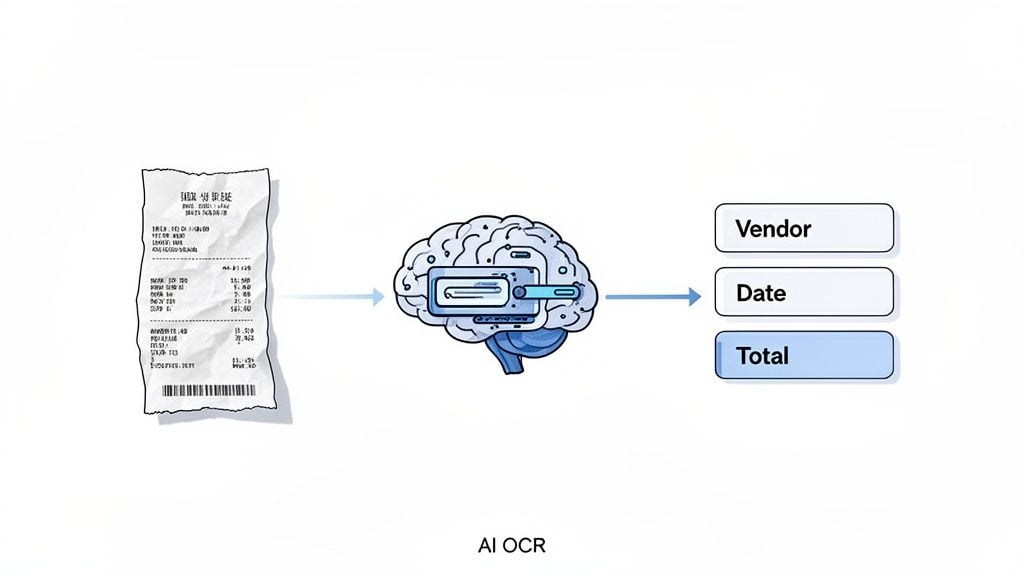
Okay, so you've got receipts flowing into your system automatically. That’s a huge win. But now what? Those images and PDFs are still just pictures. The real magic happens when we turn them into actual, usable financial data—without you having to type a single thing.
This is where artificial intelligence completely changes the game. Forget squinting at a crumpled, faded receipt or manually keying in numbers from a PDF.
The core technology here is called Optical Character Recognition (OCR), but what modern tools use is miles ahead of basic text scanning. Think of it less like a scanner and more like a junior bookkeeper who can read, understand, and categorize information.
When it sees a receipt from Amazon for office supplies, the AI doesn't just read the word "Amazon." It instantly recognizes it as the vendor. It does the same for everything else, plucking out the date, subtotal, tax, and total amount. This is the bridge that takes you from a photo of a receipt to clean, organized data ready for your books.
Why Accuracy Is Everything
Here's the thing: not all OCR is created equal. Plenty of apps can grab text from an image, but the difference between a decent tool and a great one comes down to accuracy. A top-tier receipt organizer uses AI that's been trained on millions of different receipts and invoices.
That training is what prevents costly mistakes. A basic system might get confused by a crumpled corner, read a handwritten tip incorrectly, or mistake a "5" for an "S." Suddenly, you're back to square one, hunting for errors that could throw off your entire month's accounting.
A truly accurate system, on the other hand, just gets it right. It can decipher that messy scrawl for the tip on a restaurant bill and even pull individual line items from a long, complicated invoice.
The whole point of automation is to build a system you can trust. With high-accuracy OCR, over 99% of transactions are processed perfectly. Data entry stops being a chore and becomes a quick final check. That's what makes this whole thing work.
This is precisely why we’re so big on tools like Booksmate. It takes the tedious, error-prone work off your plate and gives you consistently reliable data from the moment a receipt enters your system.
From Raw Data to Organized Information
The AI’s real superpower isn't just reading the receipt—it's structuring the information it finds. It doesn't just dump a bunch of words and numbers on you. It intelligently sorts everything into the right fields, making it instantly useful.
Any good system will automatically identify and populate:
- Vendor Name: Who got paid.
- Transaction Date: When the purchase happened.
- Total Amount: The final damage.
- Tax and Subtotal: Separating these for clean bookkeeping.
- Line Items: An optional but powerful feature that breaks down what was actually bought.
This structured data is what makes your records searchable, report-ready, and easy to sync with your accounting software. When setting things up, focusing on powerful Automation of Data Entry is key to capturing these details efficiently.
By letting AI handle this step, you’re not just getting your time back. You're building a financial record-keeping process that’s far more reliable and fundamentally less prone to human error.
Building a Digital Filing System That Works
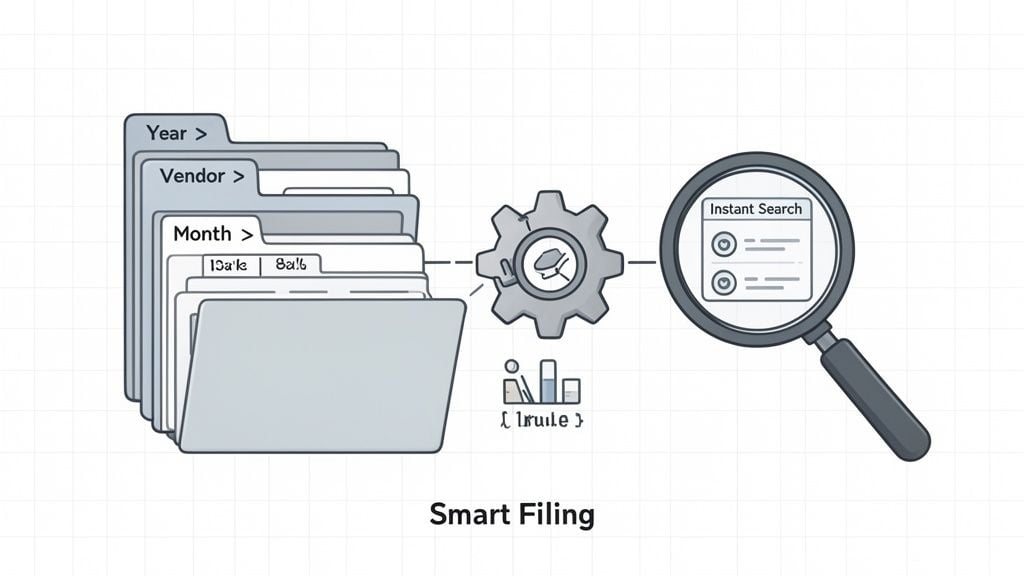
Let’s be honest. Scanning a pile of receipts and dumping them into one giant folder isn't organizing—it's just a digital shoebox. To get real control over your finances, you need a smart, logical filing system. The whole point is to find any document you need in seconds, without a frantic search.
This all starts with two key things: a clear folder hierarchy and a consistent file naming convention. When you get this right, your records are not just tidy; they're audit-ready and play nicely with your accounting software.
The best part? You only have to set up the rules once. After that, a good automation tool can take over, filing every new document perfectly without you lifting a finger.
Choosing Your Folder Structure
There are two main ways to structure your digital folders, and the best one for you really depends on how your business operates. Are you dealing with the same suppliers over and over, or is your work organized by individual projects?
- By Vendor and Date: This is the go-to method for most businesses. Think about it: you have recurring bills from the same companies every month. The structure is simple:
Year > Vendor > Month. So, a receipt from Amazon in November 2024 would land in2024 > Amazon > November. It makes tracking what you've spent with a specific vendor a total breeze. - By Project or Client: If you run a service-based business like a marketing agency, a law firm, or a construction company, this structure will make more sense. You'd organize things like this:
Client Name > Project Name > Expense Category. A receipt for lumber for the "Miller Kitchen Remodel" project would be filed neatly underMiller, John > Kitchen Remodel > Materials.
No matter which path you choose, consistency is everything. An automated tool like Booksmate lets you define these rules once. From then on, its AI automatically categorizes new receipts and moves the files into the right folders, building out your organized archive for you.
Crafting the Perfect File Naming Convention
Your folder structure is only half the battle. Your file naming convention is just as critical. A generic name like scan_001.pdf tells you absolutely nothing. A great file name should make the document identifiable at a glance, even if it’s sitting on your desktop.
A fantastic formula I always recommend is Date-Vendor-Amount-Description. This creates clear, sortable file names that give you all the key info instantly.
Here’s what that looks like in the real world:
2024-11-15-HomeDepot-142.50-Paint.pdf2024-11-12-Adobe-15.99-AcrobatPro.pdf2024-11-10-Uber-24.75-ClientMeeting.pdf
Always lead with the date in YYYY-MM-DD format. This one simple trick ensures your files automatically sort themselves chronologically inside their folders, which makes reviewing expenses for a specific month or quarter incredibly easy.
A smart business receipt organizer can be set up to apply these naming rules to every single document it processes. This combination of intelligent folders and automated naming is what finally turns that messy digital shoebox into a powerful, searchable financial database.
Connecting Your Organizer to Your Accounting Software
All the work you've put into creating a perfect digital filing system leads to this moment: connecting it all to your accounting software. This is the final step that makes everything click. By linking your receipt organizer directly to platforms like QuickBooks, Xero, or Sage, you turn that neatly organized data into real financial intelligence without hours of painful data entry.
When these two systems talk to each other, you say goodbye to those tiny, frustrating typos—the transposition errors that can throw your entire financial picture out of whack. The integration acts as a direct pipeline, pushing verified data from your organizer straight into your general ledger. No more manually typing in vendor names, dates, or amounts.
How Direct Integrations Make Life Easier
Most receipt organizers worth their salt, including tools like Booksmate, come with built-in integrations for the major accounting platforms. The setup is usually a one-and-done process. Once it’s connected, you can send approved receipts and all their data over to your books with a single click.
Think about it in a real-world context. Your marketing manager buys a new software subscription. The invoice lands in your system, the AI pulls out all the key details, and you give it a quick once-over. With the integration active, you just hit "Export." Instantly, a new bill pops up in QuickBooks Online, already categorized and with the original receipt attached for backup. It’s that simple.
The real shift here is moving from data entry to data verification. Instead of spending your day typing, your team can spend a few minutes just confirming the information the system has already put together. This is how you close the books in record time.
Clean Exports and Staying Audit-Proof
But what if there isn't a direct integration for your specific accounting software? Don't worry, you're not stuck. A good receipt organizer will still let you export your data in a clean, formatted CSV or Excel file. The columns will be perfectly structured for a quick and easy upload into your system. It’s still a massive improvement over doing it all by hand.
Beyond making your day-to-day work easier, this connected system is your best friend come audit time. The IRS requires businesses to keep detailed expense records for at least three years, and a digital archive is the most reliable way to stay compliant.
A centralized, connected system gives you:
- A Secure Archive: Every single receipt is stored digitally with its transaction data, all in one place.
- Instant Searchability: Need to find a specific receipt from two years ago? It’ll take you seconds, not hours.
- Clear Audit Trails: You can see a complete history of who submitted a receipt, who approved it, and when it was exported.
This setup provides a secure, searchable record of every business expense, ensuring you're always ready for a financial review. To get the most out of your organizer, it’s worth learning how to automate accounts payable. This creates a seamless flow from purchase to payment, building a powerful and compliant financial engine for your business.
Got Questions? Let's Clear a Few Things Up
Whenever I help a business switch to an automated receipt system, the same few questions always pop up. It’s completely normal to have them—you’re changing a core part of how you manage your finances.
So, let's walk through the most common ones I hear from clients. My goal is to give you the clarity and confidence you need to get started.
What’s the Best Way to Organize Business Receipts Digitally?
Honestly, the best approach is one where you barely have to think about it. A fully automated system that fetches, reads, and files everything for you is the gold standard. It takes human error out of the equation and gives you back so much time.
Think of it this way: you connect an automation tool like Booksmate to your email and your big supplier portals (like Amazon). It automatically pulls in all those digital invoices. For paper receipts, you just use the mobile app to snap a picture the second you get it.
From there, the AI does the heavy lifting—it reads the vendor, date, total, and all that key info. You just set up a few simple rules, and it names and files everything into a neat folder structure, maybe by vendor or by project. That’s it. You’ve built a searchable, compliant archive that runs on its own.
Can I Just Use My Phone to Organize Receipts?
Yes, and you absolutely should! Your phone is your best friend for capturing those on-the-go expenses. We all have them—that client coffee, the parking fee, or the urgent run for office supplies. A quick photo is all it takes to keep from losing that little slip of paper.
Most modern receipt organizer apps have incredible AI that can read the data right from the photo you take.
But here’s the key: your phone should be part of a unified system. The receipts you snap should land in the same central dashboard as the invoices from your email and supplier portals. This prevents you from having disconnected piles of information and gives you a single, complete picture of your spending.
How Long Should I Keep Business Receipts for Taxes?
This is a big one, and it’s all about staying compliant. In the U.S., the IRS officially says you need to keep receipts and supporting documents for at least three years from the date you file your tax return.
However, I always advise clients to be a little more cautious. The real best practice, and what most accountants will tell you, is to hold onto everything for seven years. This covers you for almost any situation and ensures you’re prepared if an audit ever comes up, even beyond the standard look-back period.
This is where a digital system is a lifesaver. It gives you secure, long-term storage that's instantly searchable. Compare that to a shoebox full of paper receipts, which are notorious for fading into blank, unreadable slips in just a few months. When you have a clean digital archive, an IRS inquiry becomes a minor task, not a major panic.
Ready to stop chasing receipts and build a financial workflow that actually works for you? With Booksmate, you can connect directly to supplier portals and email inboxes to automatically fetch and organize every single invoice. Let our AI handle the data entry so you can get back to what matters. Get started with Booksmate today!