Articles
How to Get a VAT Number A Complete Guide for 2026
Sales are moving, invoices are piling up, and someone finally asks a question that changes the mood fast: “Do we need a VAT number now?”
That’s usually how it starts. Not with a tidy compliance plan, but with momentum. A founder is watching revenue rise. A bookkeeper is trying to reconcile Stripe, Amazon, PayPal, and bank receipts. A junior finance hire is staring at a government portal, unsure whether the business is late already or still in time.
Learning how to get a VAT number sounds simple until you’re in the middle of it. The main difficulty isn’t just filing the registration. It’s knowing when registration becomes mandatory, preparing the application properly, choosing the right route, and then making sure the number flows into your invoicing and accounting process without creating new problems.
Most guides stop at “submit the form.” That’s where the practical work begins.
When Do You Actually Need a VAT Number?
The trigger usually shows up in month-end cleanup, not in a planning meeting. Sales are coming in from Shopify, Amazon, Stripe, and bank transfers. Someone pulls a 12-month view, and the question changes from "Should we register?" to "When should we have registered?"
The UK trigger many founders miss
In the UK, the test is your taxable turnover over the previous 12 months on a rolling basis.
If that turnover goes over £90,000, the business must register within 30 days from the end of the month in which the threshold was exceeded. If you miss it, penalties can be serious, as outlined in this overview of UK VAT number rules and timing.
The rolling part is what catches businesses out. A business can stay under the line for months, then cross it because the oldest low-sales month drops out of the calculation and a stronger month takes its place. That is why year-end accounts are too late for this check.
Review the rolling figure every month. If I am setting up a finance process for a small online business, I treat this as part of the close, right alongside payment reconciliations and unpaid invoice checks.
Taxable turnover is not the same as cash received
New business owners often look at the bank balance first. That is understandable, but it is not enough for VAT.
You need to assess taxable supplies under the VAT rules, not just total money received. Refunds, marketplace deductions, mixed activities, and cross-border sales can all distort the picture if you rely on rough revenue totals. A business can register late because nobody tied the sales reports back to the underlying transactions.
That matters for a second reason too. The VAT number is only the starting point. Once the registration is live, your systems need to know the right effective date, the right VAT treatment, and which sales channels should apply tax. If that handoff is weak, the business gets the number and still invoices incorrectly. Tools like Booksmate help only if the source data is right from the start.
A practical check looks like this:
- Review the last 12 months monthly: Use a rolling view, not a calendar-year snapshot.
- Work from source records: Compare website sales, marketplace statements, payment processor reports, and accounting entries.
- Separate forecasts from recorded turnover: Expected growth matters for planning, but mandatory registration is driven by what has already happened unless a forward-look rule applies.
The EU and cross-border position works differently
Outside a single-country setup, the answer gets more technical. The question is often less about one turnover threshold and more about where the supply takes place, who the customer is, and whether local registration is required.
That is why cross-border sellers should not copy a UK-only approach into an EU trading model. A seller using an EU warehouse, shipping direct to consumers in more than one member state, or mixing B2B and B2C sales may face obligations that do not show up in a simple domestic turnover review. The registration decision also affects operations. Invoice fields, VAT codes, marketplace settings, and accounting mappings all need to be aligned once the number is issued.
If you trade outside the UK and EU as well, compare each jurisdiction early. For businesses expanding into the Gulf, this guide on how to register for UAE VAT is a useful reference because it shows how different local rules, document requirements, and filing processes can be.
The practical decision point
You usually fall into one of three positions:
Situation
What to do
You have already crossed the threshold or triggered registration
Start the application now and confirm the correct effective date
You are close to the threshold
Monitor monthly and get your records ready before the deadline becomes urgent
You trade cross-border
Check whether local registration, OSS, or another reporting route applies
Registering a little early is usually manageable. Registering late creates backdated VAT issues, invoice corrections, and system cleanup work that takes far longer than the application itself.
Navigating the VAT Application Process Step by Step
You submit the VAT application on Friday, assume the hard part is done, then realise on Monday that your ecommerce platform, invoicing settings, and bookkeeping tool still are not ready for a live VAT number. That is the gap many guides miss. Getting the number is one task. Getting the business ready to use it properly is another, and the second one usually causes more disruption.
Once registration is clearly required, treat the application like a controlled handover between the tax authority and your systems. Speed helps, but consistency matters more. Delays usually come from mismatched names, dates, addresses, or activity descriptions, not from the form being technically difficult.
The UK route through HMRC
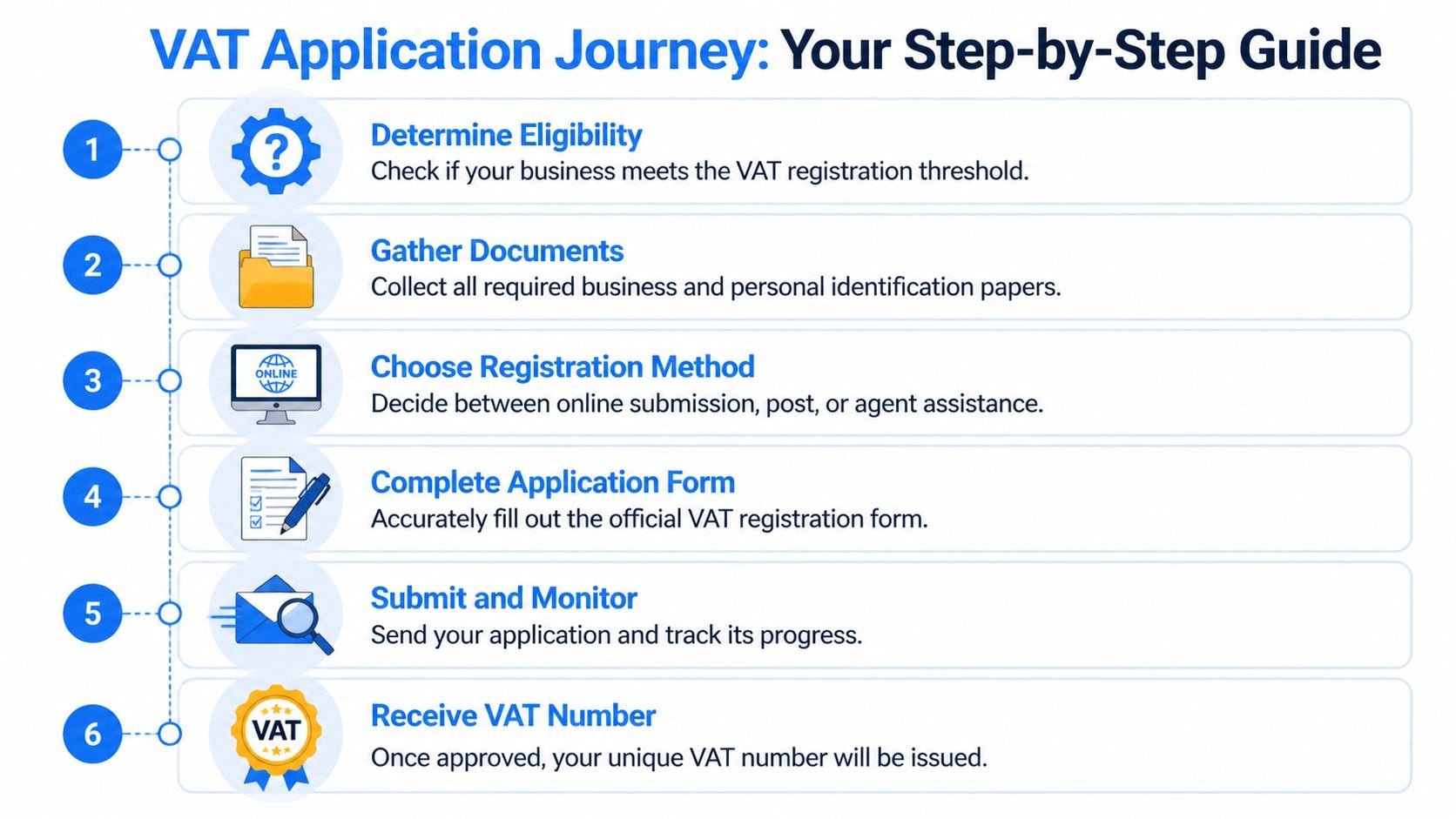
In the UK, HMRC handles VAT registration through the Government Gateway. For most businesses, the online application is the standard route.
A practical sequence looks like this:
- Confirm why you are registeringStart with the basis for registration. Threshold breach, voluntary registration, and sector or trading-pattern triggers can lead to different effective dates and different answers on the form.
- Sort access before starting the applicationIf the business does not already have a Government Gateway account, set that up first. A surprising number of delays start with login, identity, or agent access issues rather than VAT itself.
- Complete the VAT1 carefullyHMRC will compare what you enter against other records already attached to the business and its directors. If the registered address differs from Companies House, or the trading description does not line up with what the bank, website, or prior tax records suggest, expect questions.
A clean VAT application depends on consistency. Every field should match records HMRC can already check.
- Choose the VAT scheme with the bookkeeping process in mindThis decision affects more than the return. It affects cash flow, invoice handling, how transactions are posted, and whether your software setup stays simple or becomes messy.
Practical considerations are key. A business with tidy monthly records and straightforward input tax may be fine on the standard scheme. A smaller business with irregular expenses or weak bookkeeping discipline may prefer a simpler route, but only if that fits the trade and customer profile. I have seen businesses pick a scheme because it sounded easier, then spend the next year correcting postings and explaining odd results to management.
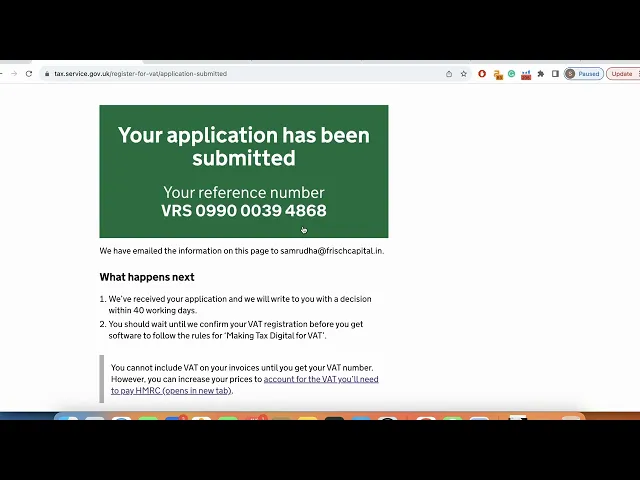
Here’s the embedded walkthrough before going further:
The EU route and when OSS helps
EU registration takes more care because the rules are harmonised in broad terms, but the application process is still administered country by country. The right route depends on where stock sits, where customers are based, whether sales are B2B or B2C, and whether a simplification such as OSS covers the transactions.
Use the structure below to test the route before filing anything:
Route
Best fit
Main benefit
Main caution
Local VAT registration in a member state
Businesses with a direct local obligation in that country
Direct local compliance and local reclaim position
Extra filings, local correspondence, and country-specific admin
OSS
B2C distance sales that fall within the scheme
Centralised reporting for qualifying sales
It does not replace every local registration need
IOSS
Certain imported low-value goods
Simpler import VAT treatment for that model
Only suitable for specific goods and supply chains
OSS helps in the right fact pattern. It does not fix poor setup. If product tax codes, marketplace settings, and customer-country logic are wrong in your systems, the reporting will still be wrong, just faster.
If Spain is part of your footprint, local advice can save time because country practice matters as much as the headline rule. For that kind of situation, expert VAT support for Spain can be useful, especially where filings, documentation, and local tax correspondence need a Spanish perspective.
What usually works, and what usually causes delays
Applications move faster when the business has already reconciled the legal record, tax profile, bank details, and trading facts before anyone opens the form.
What helps:
- Exact legal detailsUse the registered business name, official address, and director details exactly as held on formal records.
- Turnover support that ties backKeep sales reports, accounting totals, and marketplace statements ready in case the authority asks how the registration trigger was identified.
- A plain trading descriptionSpecific wording works better than vague wording. “Wholesale electrical components to UK contractors” is easier to assess than “general trading”.
- System planning before approval arrivesDecide in advance who will update invoices, chart of accounts, VAT codes, ecommerce settings, and software connections once the number is issued. If you use Booksmate or a similar tool, check the VAT fields and tax mappings before the approval email lands.
What slows things down:
- Estimated figures that could have been checkedIf turnover can be calculated from records, calculate it.
- Old addresses or stale director informationSmall mismatches often trigger manual review.
- Leaving the effective date unresolvedThat date drives invoice treatment, return periods, and possible backdated VAT.
- Treating registration as an isolated admin taskThe form may be filed by one person, but the consequences hit finance, sales, operations, and software at the same time.
After submission
Do not assume submission means the job is done.
There may be a quiet period, a request for clarification, or a straightforward approval. Keep the reference number, monitor correspondence, and store the supporting file where the finance team can get to it quickly. Once the VAT number arrives, it needs to be pushed into invoices, accounting software, platform settings, and customer-facing documents without delay. If that handoff is not planned, significant clean-up work starts after approval, not before.
Gathering Your VAT Registration Toolkit
A VAT application goes faster when the evidence is ready before anyone opens the portal.
That matters more than people expect. Delays usually come from messy records, inconsistent names and addresses, or turnover figures that cannot be traced back to sales reports and bank entries. The form itself is rarely the hard part.
What to assemble before you start
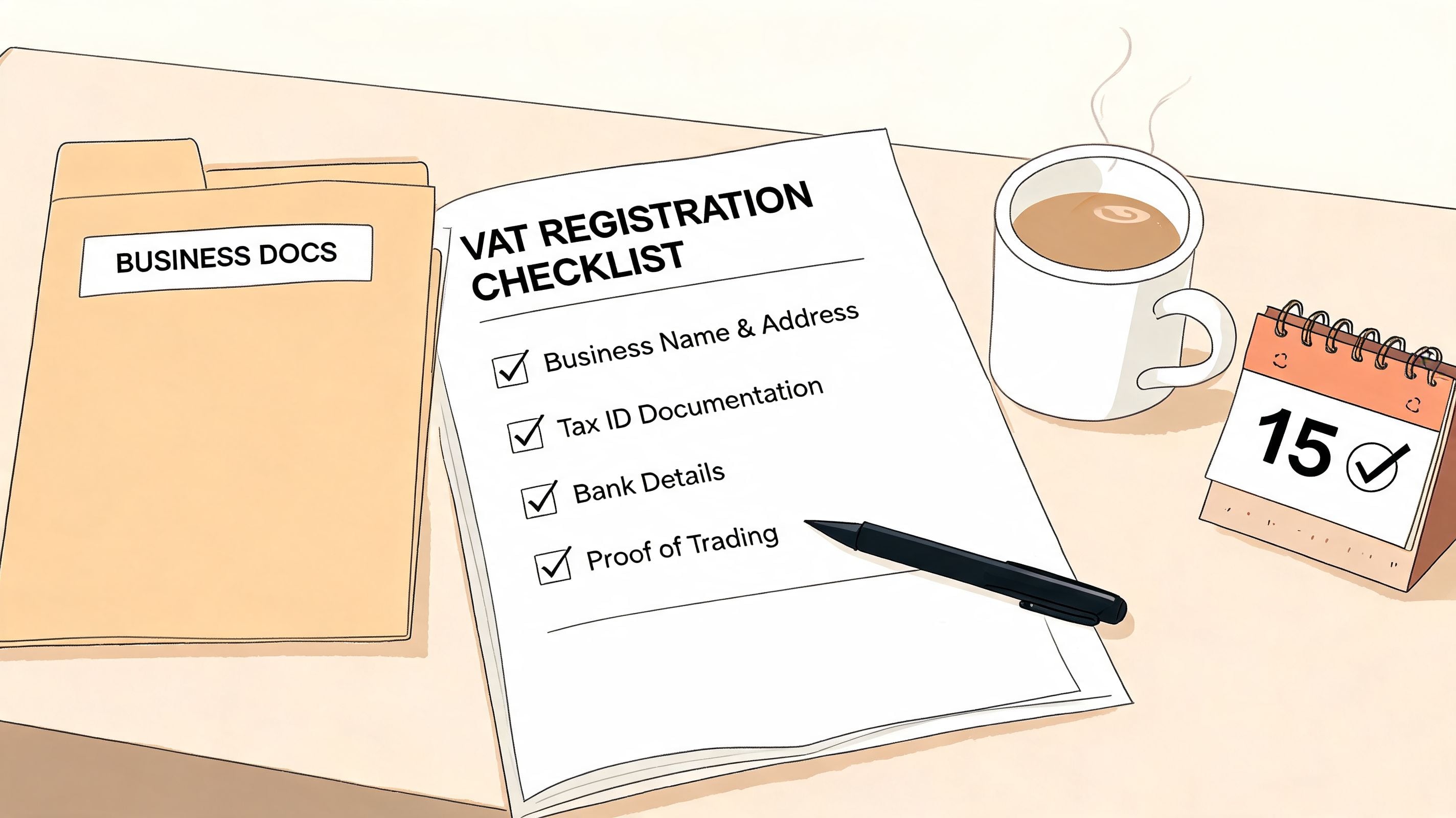
Build one file, digital or physical, that holds the documents and figures behind the application.
You will usually need:
- Legal business detailsRegistered name, trading name if relevant, business address, and contact details.
- Tax identifiersNational Insurance number for individuals where required, and UTR if applicable.
- Corporate records Companies House information, director details, and a clear description of what the business does.
- Bank detailsThe account details HMRC may need for the registration profile and later tax administration.
- Identity documentsPassport or driving licence, depending on the checks requested.
- Turnover evidenceHistorical sales records, current trading data, and support for projected turnover if HMRC asks for it.
Good preparation is less about collecting paperwork and more about making sure each item agrees with the others. If the company record says one thing, the bank statement says another, and the draft application says something slightly different again, someone will have to stop and resolve it.
Consistency matters more than volume
A thick file does not help if the details conflict.
Check the company name, trading address, director names, and dates exactly as they appear on official records. If the correspondence address differs from the registered office, make sure there is a clear reason and that everyone involved knows which one belongs on the application. The trading description should also line up with the website, invoices, bank narrative, and bookkeeping records.
A simple working method helps. Put the Companies House record, bank details, ID documents, and draft VAT application side by side. Then check each field line by line. It is dull work, but it prevents the kind of avoidable query that turns a straightforward application into a week of email chasing.
Build a turnover pack someone else can follow
Here, weak applications often surface.
Single-channel businesses can usually explain turnover quickly. Multi-channel businesses need more discipline. Card processors, marketplaces, subscription tools, and bank receipts often describe the same activity in different ways. If you cannot show how the application figure was calculated, you create work for yourself later.
Use a short pack like this:
Document
Why it matters
Sales summary by month
Shows how the turnover figure was built
Platform reports
Supports the sales totals from each channel
Bank reconciliation view
Explains timing differences between sales and cash received
Notes on unusual items
Clarifies refunds, one-off transactions, or non-sales receipts
Keep it readable. The goal is not to impress HMRC with volume. The goal is to make the numbers easy to verify.
Prepare for the part guides usually skip
Once the VAT number is issued, the same source file often becomes the reference point for your setup work in accounting software and automation tools.
That is why I prefer to build the toolkit with post-registration use in mind. If turnover categories are unclear now, VAT code mapping will be unclear later. If the business activity description is vague, someone configuring Booksmate, Xero, QuickBooks, or an ecommerce connector may struggle to choose the right tax treatment. The registration pack should already tell the next person how the business sells, where revenue comes from, and which records support it.
That handoff saves time. It also reduces the risk of a business getting the number, then spending the next two weeks correcting invoice settings, tax codes, and imported transactions.
Small checks that prevent bigger problems
A few details are easy to miss and expensive to fix later:
- Director ID ready to uploadFind it before the application starts, not halfway through.
- Exact bank account name and detailsUse the formal account name, not the shortened version everyone uses internally.
- Business activity wordingDraft one plain-English sentence that matches real trading activity.
- Turnover forecast supportIf projected figures are required, tie them back to orders, contracts, pipeline, or a defensible sales pattern.
- Software readiness notesRecord which systems will need the VAT number, VAT effective date, and tax settings once approval comes through.
The businesses that handle VAT registration well usually treat the toolkit as an operating file, not just an application file. That approach makes approval easier and makes the digital setup after approval much less painful.
You Have a VAT Number Now What?
Getting the VAT number changes your obligations immediately. That’s the point many businesses underestimate.
The most common post-registration problem isn’t refusing to comply. It’s assuming the number can just be dropped into the footer of an invoice template and everything else will somehow sort itself out. It won’t.
Your invoices need to change
Once registered, your sales documents need to support VAT treatment properly. The VAT number isn’t decorative. It belongs in a compliant invoicing process, and customers who are entitled to reclaim VAT will expect the documentation to be correct.
That means reviewing invoice templates in every system you use. Not just your accounting software. Also billing tools, payment platforms, marketplaces where you control invoice settings, and any manual templates that staff still send as PDFs.
A short audit helps:
- Sales invoices: Add the VAT number and ensure VAT treatment is reflected correctly.
- Credit notes: Check they follow the same logic as invoices.
- Marketplace outputs: Confirm whether the platform or the seller is responsible for the invoice in that sales flow.
- Recurring billing tools: Update stored invoice settings, not just one-off documents.
Verification is now part of the workflow
Post-Brexit, verification has become more important operationally. It is essential to verify UK VAT numbers via the HMRC checker for domestic trade and use VIES for EU trade to ensure correct B2B zero-rating. Any changes to your business details must be reported electronically to the relevant tax authority, typically within 30 days, as noted in this explanation of UK and EU VAT verification after Brexit.
That matters because VAT treatment in B2B transactions can depend on whether the customer’s VAT number is valid at the time of the transaction. If staff don’t verify, the business can apply the wrong treatment and discover the problem much later during review or filing.
Validate before you rely on zero-rating. Fixing a bad VAT assumption after invoices have gone out is much harder than checking first.
Record-keeping becomes a daily job
New registrants often think in quarters because VAT returns feel quarterly in practice. The primary control point is daily bookkeeping.
You need records that support output tax, input tax, adjustments, and the logic behind unusual transactions. If your data comes from several systems, the challenge isn’t only storing documents. It’s linking the documents to the accounting entry and preserving enough detail to explain why VAT was handled that way.
That’s where weak workflows show up fast. Common failure points include:
Weak point
What goes wrong
Manual invoice storage
Documents go missing at return time
Inconsistent supplier names
Input VAT review becomes slower
Separate portal logins with no routine
Purchase evidence is gathered late
Untracked business detail changes
The tax record and trading record drift apart
New businesses should expect operational friction
There’s usually a short adjustment period after registration. Prices may need review. Customers may ask questions. Staff may use old templates. Some suppliers will still issue documents in an old format because nobody told them the business is now VAT registered.
That’s normal. The businesses that handle it well create a short post-registration checklist and work through it in the first few days:
- Update invoicing systems
- Notify internal staff who raise invoices
- Check VAT settings in accounting software
- Set a routine for customer and supplier verification where relevant
- Review how purchase invoices are captured and stored
The VAT number is the start of a managed process. Treat it that way and the rest becomes far easier.
The Accountant’s VAT Workflow with Booksmate
The hardest part of VAT compliance usually isn’t understanding the rule. It’s getting the evidence together in a form that survives real life.
A newly registered business may have the right VAT number, the right intention, and still create a poor compliance trail because invoices are spread across Amazon, Stripe, PayPal, Google, Microsoft, and email inboxes. An accountant then spends hours chasing documents that already exist, just not in one place.
Why manual VAT admin breaks down
Manual collection creates three recurring problems.
The first is inconsistency. One client downloads Amazon invoices monthly. Another forgets until quarter-end. A third forwards some receipts from email but leaves portal invoices untouched.
The second is formatting friction. VAT IDs, invoice layouts, and supplier naming conventions vary by country and by platform. That makes manual entry more fragile than people expect.
The third is export failure. The records may exist, but they don’t always pass cleanly into the accounting system with the right fields populated.
A 2025 EU VAT compliance report notes that 25% of newly registered SMEs face refund delays because accounting exports fail validation. The same source says AI-driven data extraction that syncs VAT IDs from portals can reduce these manual errors by up to 70%, which is why the workflow gap described in this VAT registration number guide matters so much in practice.
The workflow accountants actually need
For VAT work, the useful question isn’t “Can we automate something?” It’s “Which repetitive steps create avoidable risk if a person does them by hand every time?”
The answer is usually this chain:
- Retrieve invoices from portals and inboxes
- Extract key fields consistently
- Organise documents by supplier and period
- Export them into the accounting stack with minimal rework
- Keep the source document available for review
When that chain is weak, VAT return preparation gets slower, and input tax support gets weaker. When that chain is strong, compliance work becomes calmer and easier to review.
Operational test: If a team can’t pull a supplier invoice and its extracted details within a few clicks, the workflow still depends too much on memory and manual effort.
Where automation fits after registration
This is the part most “how to get a VAT number” articles skip. Once the number exists, it has to live inside a process.
A sensible automated setup does three things well:
- Fetches documents from the systems where they originateThat includes web portals and email, not just uploads from staff.
- Captures VAT-relevant fields consistentlySupplier details, invoice dates, VAT IDs, and amounts need to move cleanly into review and export.
- Centralises the audit trailAccountants need the document and the extracted data together, not in separate worlds.
That matters even more for firms handling multiple clients. Multi-entity VAT work becomes difficult when every client has a different habit for downloading invoices and naming files. Standardisation is where automation starts to pay off operationally.
What good looks like
A clean VAT workflow after registration should feel boring. That’s a compliment.
Invoices arrive from the original source. Data is extracted consistently. The dashboard shows what’s been collected and what still needs review. Exports to accounting software are routine rather than a rescue mission before filing deadlines.
That doesn’t remove judgment. Accountants still review treatment, exceptions, and unusual transactions. It removes the low-value effort of hunting for documents and retyping obvious fields.
For a business owner, that means fewer surprises. For a practice, it means VAT work scales without becoming a document chase.
Common VAT Registration Questions
Can I register voluntarily before I’m required to?
Yes, in many cases voluntary registration is possible. Whether it’s sensible depends on the business model, customer base, and how much VAT recovery matters relative to the extra admin. It can help in some B2B settings. It can also complicate pricing if your customers are mainly consumers.
How long does it take to get a VAT number?
Processing times vary by authority and by how clean the application is. In the UK, online applications can take from a few days to several weeks according to the earlier HMRC-related guidance already discussed. The practical answer is to prepare for queries rather than assuming a fixed timeline.
Can I issue invoices while I’m waiting?
That depends on the timing and the effective date of registration. This needs care because the effective date and the approval date are not always the same thing in practice. If there’s any uncertainty, get advice before sending invoices that may need correction later.
What if I made mistakes in the application?
Fix them quickly. Don’t hope they won’t matter. If the authority asks questions, answer with clear supporting records rather than loose explanations.
Do I need to check other businesses’ VAT numbers?
If the VAT treatment depends on the customer’s status, yes. Verification should be part of the transaction process, not an afterthought at return time.
What should I do on the day the VAT number arrives?
Use a short action list:
- Update invoice templates
- Adjust VAT settings in billing and accounting tools
- Check customer and supplier workflows
- Save the registration confirmation in your permanent tax file
- Tell the people who issue invoices
If you’re tired of chasing invoices across portals and inboxes after VAT registration, Booksmate gives your team a cleaner way to collect documents, extract key data with AI, and keep everything organised for export into accounting software. It’s built for the part most VAT guides ignore. Using the number properly once you’ve got it.