Articles
A Friendly Guide to OCR Invoice Software
If your finance team is swimming in a sea of invoices, you know the feeling. The stacks of paper, the endless PDFs piling up in inboxes—it’s a constant battle. OCR invoice software is designed to pull you out of that mess.
Think of it as a smart assistant that automatically reads, understands, and plugs invoice data right into your accounting system. It takes over the tedious, soul-crushing manual entry, freeing up your team to focus on work that actually requires their expertise.
So, What Is OCR Invoice Software, Really?
Let’s walk through a familiar scenario. Your accounts payable team gets an invoice emailed as a PDF. The old way involves someone opening that file, squinting at the details—vendor name, invoice number, due date, line items, total—and then typing it all, field by field, into your accounting software. It’s painfully slow, mind-numbingly repetitive, and a breeding ground for typos that can cost you real money.
Now, let’s replay that with OCR invoice software in the picture. The software automatically pulls in the email attachment, recognizes it’s an invoice, and gets straight to work. This is where the real power of Optical Character Recognition kicks in.
From Image to Actionable Information
At its most basic level, the software uses a technology that turns a picture of a document into usable text. If you want to dive deeper into the core tech, you can learn more about Optical Character Recognition (OCR). It’s essentially a digital translator that can look at a scanned document and type out every word it sees.
But just having a wall of text isn’t very helpful, is it? The true breakthrough comes from the Artificial Intelligence (AI) built on top of the OCR. This AI layer is the “brain” of the operation. It sifts through all that raw text to figure out what it all means.
It intuitively knows that “Invoice #” is a unique ID, “Due:” signals a payment deadline, and the number next to “Total” is the final amount you owe. This intelligence is what allows the system to read and correctly pull data from thousands of different invoice layouts without ever needing you to build a specific template for each vendor.
Key Takeaway: OCR invoice software isn’t just turning pictures into text. It’s the combination of OCR “eyes” and an AI “brain” that allows it to read, understand, and process invoices just like a person would—only much, much faster.
The Shift From Luxury To Necessity
For a long time, this kind of automation felt like something only giant corporations could afford. Not anymore. Today, it’s a mission-critical tool for businesses of every size, and the market’s explosive growth tells the whole story.
The global invoice processing software market is expanding at a breakneck pace, which shows just how vital this technology has become for modern finance teams. In 2026, the market was valued at USD 49.04 billion, a massive leap from USD 40.52 billion in 2025. That reflects an incredible 21% compound annual growth rate. You can explore this trend in more detail in a recent invoice processing software market report.
This isn’t just hype; the growth is fueled by the clear and immediate benefits that automation delivers. Let’s put the old way and the new way side-by-side.
Manual vs OCR Invoice Processing A Quick Comparison
This table gives you a clear, side-by-side look at the old way versus the new way of handling invoices, making the benefits of automation easy to see.
Aspect
Manual Processing
OCR Invoice Software
Speed
Days or weeks per invoice
Minutes or seconds
Accuracy
Prone to data entry errors
Over 95% accuracy with AI validation
Cost
High labor costs, late fees
Low subscription cost, early payment discounts
Visibility
Poor; invoices get lost
Real-time tracking and audit trails
Scalability
Difficult; requires more staff
Easily handles growing invoice volumes
The differences are stark. Once you see the numbers, it becomes obvious why so many finance teams are making the switch. It’s less about gaining a competitive edge and more about keeping up with the new standard.
How AI Helps Your Software Read Any Invoice
Ever looked at a stack of invoices from different vendors and wondered how any software could possibly make sense of them all? They all have unique layouts, different terms, and information scattered everywhere. It’s not magic, but a smart combination of two technologies working together.
First, you have what you could call the “eyes” of the system: Optical Character Recognition, or OCR. At its core, OCR is like a digital scanner that looks at an invoice image or PDF and simply converts every letter and number it sees into raw, machine-readable text.
But that raw text is just a jumble of words and numbers. It’s like someone handing you a page from a book with all the sentences mixed up. You have the words, but they’re useless without any context. This is where the real intelligence—the “brain” of the operation—comes into play.
From Raw Text to Structured Data
This is where Artificial Intelligence (AI) takes over. The AI model analyzes all that jumbled text from the OCR and starts figuring out what everything actually means. It’s been trained on millions of invoices to recognize the common patterns and clues that we humans take for granted.
For instance, the AI learns that the characters following “Invoice No.” or “Inv#” are the invoice number. It knows that a date next to “Due Date” is the payment deadline, and the amount next to “Total” is what you need to pay. This is the secret sauce that allows ocr invoice software to handle invoices from thousands of different suppliers without needing a custom template for each one.
Just look at the difference between the old way of doing things and a modern OCR workflow.
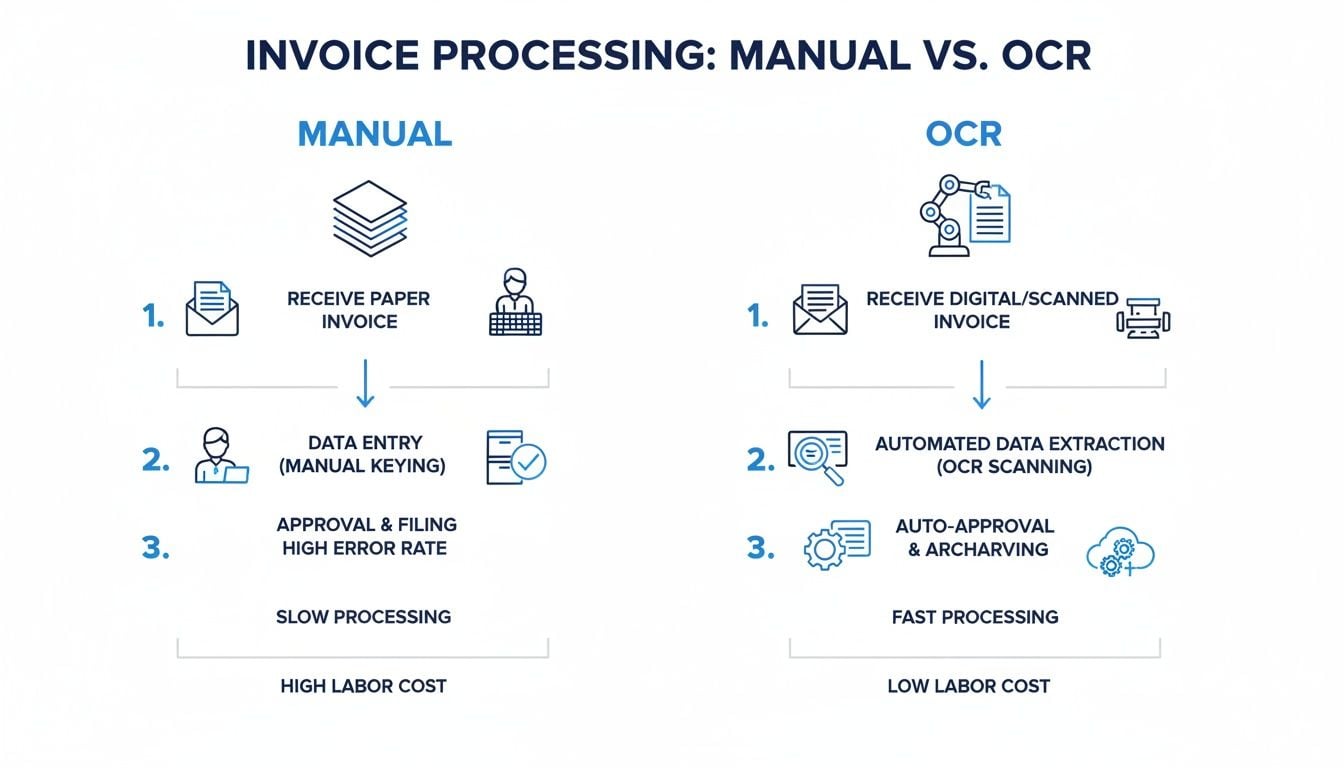
As you can see, what used to be a slow, manual grind becomes a fast, hands-off process. The time your team gets back is enormous.
The Power of Learning and Adaptation
Here’s the most powerful part: the AI learns and gets better over time. It’s not a static program. Think of it like a new hire on your AP team.
The first time the software sees a brand-new invoice layout, it might get a little confused and flag a field for a quick human check. When you click to confirm, “Yes, that’s the PO number,” the AI makes a note of it. The next time an invoice from that same vendor comes in, it will remember that placement and nail it, improving its own accuracy with every document it processes.
It’s this continuous learning loop that makes modern AI-powered OCR so effective. The system adapts to the real world of messy, inconsistent documents, making it a flexible and reliable partner for your finance team instead of a rigid, template-based tool.
This adaptive intelligence is why OCR technology is taking off. The market is projected to grow from around $12.6 billion in 2023 to an incredible $37 billion by 2030. That’s a steady growth of over 15% every year, showing just how essential this tech has become.
Fine-Tuning the AI for Peak Performance
Behind the scenes, a lot of work goes into making these AI models so sharp. To get software to a point where it can accurately read all sorts of invoice formats, developers need to know how to fine-tune LLMs. This involves training the AI on massive datasets of real-world documents, teaching it the subtle differences between layouts, languages, and industry-specific terms.
This ongoing refinement results in some major wins for your team:
- Higher Accuracy: Fewer mistakes mean your team spends less time fixing things and more time on high-value work. Your books are cleaner, too.
- Broader Document Support: The software gets smarter at processing more than just standard invoices. It can easily handle receipts, credit memos, and purchase orders.
- Increased Automation: As the AI’s confidence grows, more invoices can fly through the system with zero human intervention. This is what we call “straight-through processing,” and it’s the ultimate goal.
In the end, it’s the combination of the OCR “eyes” and the adaptive AI “brain” that turns ocr invoice software from a basic data-entry gimmick into a truly intelligent automation engine that delivers real efficiency.
Alright, you’re on the hunt for an OCR invoice software solution. It’s easy to get lost in all the marketing buzz, but finding the right tool isn’t about checking off a generic list of features. It’s about finding a system that truly understands how your finance team works and actually makes your life easier.
To help you cut through the noise, I’ve put together a practical guide based on years of experience. Let’s talk about what really matters when you’re evaluating these tools.
Core Data Extraction Capabilities
First things first: not all data extraction is created equal. Some basic tools might just pull the invoice total and due date, which honestly doesn’t save you much time. A truly helpful solution digs much deeper, getting into the nitty-gritty details so your team doesn’t have to.
Here’s what you should demand from any tool you consider:
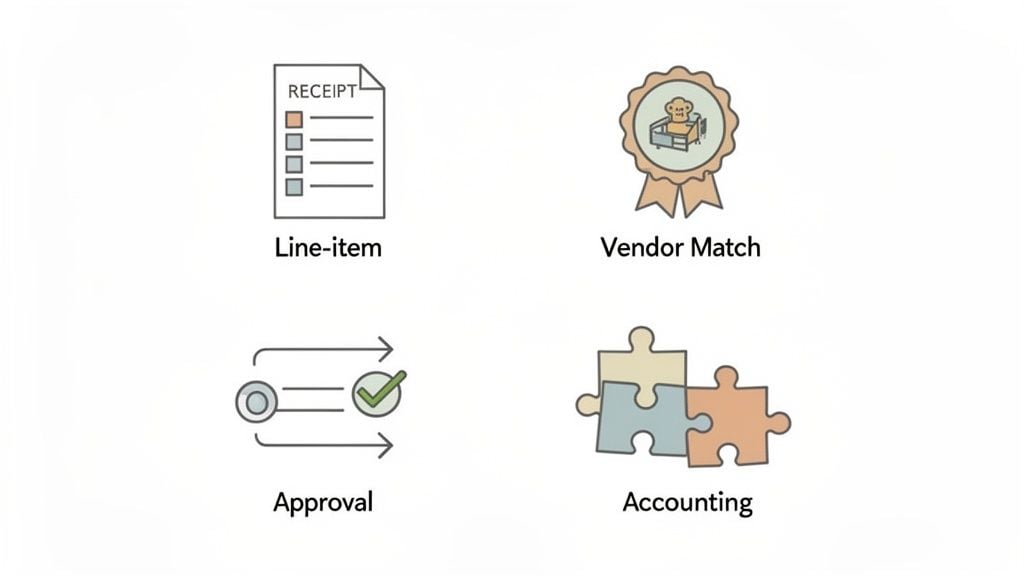
- Line-Item Extraction: This is a non-negotiable. The software absolutely must capture every single line item from an invoice. I’m talking about the description, quantity, unit price, and total for each item. Without this, you can’t do accurate job costing or get a clear picture of your expenses.
- Automatic Vendor Matching: The system should be smart enough to recognize a vendor from an invoice and instantly match it to their profile in your books. Even better, if it’s a new vendor, it should flag this for you, so you can create a profile without accidentally making duplicates.
- Purchase Order (PO) Matching: If your company uses purchase orders, this is a must. The software needs to perform two-way or three-way matching, automatically comparing the invoice to the PO (and the goods receipt, if you use them) to make sure everything adds up before a single dollar is sent.
Automation Beyond Just Data Entry
Pulling the data is only half the battle. The real magic happens when the software automates the entire accounts payable workflow, from the moment an invoice lands in your inbox to its final approval. A great OCR invoice software should be the command center for your entire AP process.
Look for these key workflow features:
- Customizable Approval Routing: Every business has its own chain of command for approvals. Your software should let you build flexible workflows that send invoices to the right person based on the amount, department, or vendor. No more chasing down managers for signatures.
- Exception Handling: Let’s be realistic—no system is perfect. Invoices will come in with price discrepancies or missing PO numbers. A good system won’t just fail; it will automatically flag these exceptions and route them to the right person for a quick review, keeping bad data out of your accounting system.
Key Performance Metric to Ask About: What is your ‘Straight-Through Processing (STP) Rate’? This number tells you exactly what percentage of invoices fly through the system from start to finish without anyone needing to touch them. A higher STP rate is your best indicator of true automation.
Integrations and Usability
A powerful tool that doesn’t talk to your other systems is just another headache. Seamless integration is what ties everything together, turning a collection of apps into a smoothly running financial machine.
Here’s a simple checklist for evaluating integrations:
- Direct Accounting Software Sync: The tool must have a deep, two-way connection to your accounting platform, whether you’re on QuickBooks, Xero, NetSuite, or something else. Data should flow back and forth effortlessly.
- Automated Document Fetching: Manually uploading every single invoice is a drag. Look for tools like Booksmate that can log in to supplier portals (like Amazon or Google) or monitor an email inbox to fetch invoices for you. This creates a completely hands-off process.
- User-Friendly Interface: If your team can’t figure out how to use it, they won’t. The software should be intuitive, with a clean dashboard that gives you a bird’s-eye view of all your invoices—what’s pending, what’s approved, and what’s paid.
Choosing the right OCR invoice software is a big decision that can pay off massively. If you focus on these core capabilities and ask the right questions, you’ll be well on your way to picking a tool that delivers real, measurable results for your finance team.
Common Invoice Automation Problems and How to Solve Them
So you’ve invested in ocr invoice software, hoping to finally escape the drudgery of manual data entry. But instead of smooth sailing, you find yourself dealing with a whole new set of frustrations. It’s a common story, but the good news is that these hurdles are well-known, and with the right approach, they are entirely solvable.
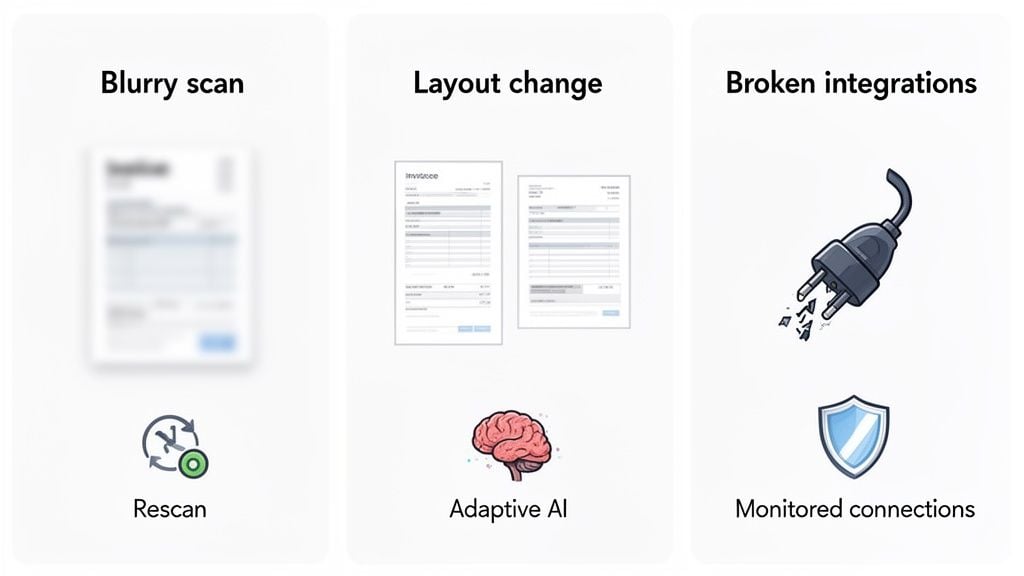
Let’s walk through the three biggest roadblocks that teams run into and talk about what actually works to get your AP process running smoothly.
The Blurry Scan and Poor Image Quality Problem
We’ve all seen them—invoices that look like they were faxed in the 90s, scanned at a weird angle, or saved as a grainy PDF. This is where most basic OCR systems fall flat. The software can’t read what it can’t see, which leads to errors and forces your team right back to manual keying.
You can’t force every vendor to buy a new scanner, but you can choose software that anticipates this problem. A smart, AI-powered system has image pre-processing built right in. Before it even tries to read the invoice, it automatically cleans it up.
- Deskew and Straighten: It fixes documents scanned crookedly.
- Enhance Contrast: Faint, hard-to-read text is made dark and crisp.
- Remove Noise: It gets rid of random spots and shadows that can confuse the system.
This cleanup stage is critical. By automatically improving the image quality first, a modern tool dramatically increases accuracy and cuts down on the exceptions your team has to review.
The Dreaded Vendor Layout Change
This one is a classic automation killer. You spend weeks getting your old, template-based OCR to read invoices from a key supplier perfectly. Then, one Tuesday morning, that supplier decides to redesign their invoice. They move the P.O. number, change the date format, and suddenly your whole workflow is broken.
If this happens, it’s a sure sign you’re working with outdated technology. The answer isn’t to constantly rebuild templates; it’s to use software that doesn’t need them in the first place.
Modern ocr invoice software uses AI to read an invoice much like a human would. It doesn’t look for the invoice number in a specific coordinate on the page. Instead, it looks for the label “Invoice #” and understands the characters next to it are the data you need, no matter where they are.
This AI-driven flexibility is what makes an automation system resilient instead of fragile. It means a simple design change from a vendor is a non-issue, not a crisis that shuts down your AP department.
The Nightmare of Broken Connections
For many businesses today, the biggest headache isn’t just processing the invoice—it’s getting your hands on it. Think of all the vendors like Amazon, Google, or Microsoft that require you to log into their portal, find the right billing page, and manually download the PDF.
Some tools try to fix this by offering hundreds of direct integrations, but this often creates a maintenance nightmare. A tiny change to a vendor’s website or API can break a connection, and suddenly you’re back to downloading invoices by hand.
A much better approach is to use a platform that prioritizes reliability. For example, a service like Booksmate provides a focused set of portal and email connections that are actively monitored and maintained. This is a game-changer because it means:
- Reliable Fetching: The connections to your biggest suppliers are constantly checked to make sure they’re working.
- True Automation: Invoices from those key portals are collected for you, creating a truly hands-off workflow from retrieval all the way to data entry.
- Reduced IT Burden: Your team is freed from the thankless job of fixing brittle connections and troubleshooting broken APIs.
By solving the document collection problem first with reliable, monitored connections, you eliminate one of the most frustrating bottlenecks in the entire accounts payable cycle.
Proving the Value: How to Justify the Cost of Invoice Automation
Let’s be honest: asking your boss for money to buy new software can feel like a tough sell. To get the green light for ocr invoice software, you can’t just talk about “saving time.” You need a bulletproof business case that speaks the language of the C-suite: Return on Investment (ROI). It’s all about showing them the money.
So, where do you start? The best place is by looking at the money you’re already losing. How many late payment fees are you eating because invoices get lost in someone’s inbox? Are you missing out on early payment discounts because your approval chain moves at a glacial pace? These are real dollars slipping through the cracks every single month.
When everything is automated, you have a live, real-time view of every single invoice. Nothing gets missed. Suddenly, you can easily grab that 2% discount on a $10,000 invoice just by paying it 20 days early. That might not sound like a game-changer on its own, but multiply that by hundreds of invoices a year, and the savings start to look very, very real.
Calculating Your Potential ROI
To make this concrete, let’s run the numbers on a hypothetical—but very realistic—scenario. Say your company processes about 500 invoices per month by hand. The costs are there, but they’re often buried.
Think about the sheer labor involved. If it takes one of your team members an average of 15 minutes to manually type, code, and route a single invoice, you’re looking at 125 hours of work every month. That’s one person spending more than three full weeks just on tedious data entry, not to mention all the time wasted chasing approvals and fixing the inevitable typos.
The Real Cost of Manual Processing: People often think the cost is just an AP clerk’s salary. But the true cost is a toxic cocktail of late fees, missed discounts, the expense of fixing errors, and—most importantly—the lost opportunity of what your skilled finance team could be achieving with that time.
Ready to see how the math plays out? Use this sample ROI calculation to see the potential savings and build a compelling business case for your own company.
ROI Calculation Example (500 Invoices/Month)
The table below breaks down the annual costs for a business handling 500 invoices a month, comparing a manual process to one powered by OCR software.
Cost Category
Annual Cost (Manual)
Annual Cost (With OCR Software)
Annual Savings
Labor (Data Entry)
$37,500
$7,500
$30,000
Late Payment Fees
$2,500
$0
Missed Discounts
$5,000
$500
$4,500
Total Annual Cost
$45,000
$8,000
$37,000
With a potential annual savings of $37,000, the conversation instantly changes. The software is no longer a “cost”—it’s an investment that pays for itself many times over.
Don’t Forget the “Soft” Benefits and Compliance Wins
It’s not just about the numbers on a spreadsheet, either. Automating the drudgery of invoice processing has a massive impact on your team. It cuts down on friction and frustration, which means better morale and lower turnover. Your vendors will be happier, too, when they’re paid on time, every time.
And what about audits? They go from a dreaded, multi-week scramble through filing cabinets and email chains to a straightforward, almost pleasant review. With a clean, searchable digital trail for every single invoice, you can pull up any document and its approval history in seconds.
Ultimately, making this change brings your company in line with where the industry is heading. The Invoice OCR API market, which is the engine behind these tools, was valued at USD 1.5 billion in 2024 and is projected to explode to USD 5.8 billion by 2033. You can dig into these numbers and learn more about the growth of the Invoice OCR API sector.
By embracing ocr invoice software, you’re doing more than just fixing a broken process. You’re setting your company up for a more efficient, profitable, and scalable future.
Your Questions About OCR Invoice Software Answered
Okay, so the benefits sound great, but you’ve still got some questions. That’s completely normal. Bringing any new tool into your finance workflow is a big decision, and you need to be sure it’s the right fit for your team and your specific challenges.
Let’s get straight to it. Here are the most common questions we hear from finance teams just like yours, along with some direct, no-fluff answers to help you get the clarity you need.
How Accurate Is OCR for Invoices and Receipts?
This is usually the first thing everyone asks, and for good reason. The short answer? Today’s OCR invoice software, especially when it’s backed by good AI, is incredibly accurate. We’re talking over 95% accuracy right out of the box for the best systems on the market.
But let’s be real—no technology is 100% perfect. You’re always going to get that one scanned receipt that’s a bit blurry or an invoice from a brand-new vendor with a totally unique layout. This is where you can spot the difference between a decent tool and a great one.
A smart system knows what it doesn’t know. Instead of guessing and pushing a potential error into your accounting software, it flags any field where its confidence is low. It then simply asks a human on your team for a quick confirmation.
Think of it this way: instead of your team manually keying in 100% of the data from every single invoice, they’re now just glancing over the 5% of fields the AI wasn’t totally sure about. This simple shift in focus is what really slashes the error rates you see with manual data entry.
And here’s the best part: the AI learns from every correction you make. When you confirm a field on a vendor’s invoice for the first time, the system remembers that. The next time an invoice from that same supplier comes in, it gets it right. This creates a learning loop where the software gets smarter and more tailored to your specific vendors over time.
What If My Vendors All Use Different Invoice Formats?
This is precisely the problem that modern, AI-powered OCR invoice software was designed to solve.
In the old days, OCR tools were rigid and relied on templates. For every single vendor, you had to manually draw a box and tell the software, “The invoice number is here, the date is here, and the total is here.” If a supplier so much as moved their logo, the template would break, and the automation would fail. It was brittle and a huge headache.
Thankfully, that whole approach is now completely outdated. Today’s AI doesn’t need a map because it’s not looking at the layout—it’s reading for context.
It works a lot more like a person does. The AI scans the document and actively looks for contextual clues and keywords to understand the information. For example, it knows to look for:
- Text like “Invoice #” or “Inv. No.” to find the invoice number.
- Phrases like “Due Date” or “Payment Due” to pinpoint the deadline.
- Labels like “Total” or “Amount Due” to identify the final amount.
Because the AI isn’t locked into a specific spot on the page, it can correctly read thousands of different invoice designs from all your suppliers without any pre-configuration. This flexibility is what makes modern automation so resilient and genuinely useful.
How Hard Is It to Set Up and Integrate OCR Software?
The thought of kicking off a long, complicated IT project is enough to make anyone pause. The good news is that the best cloud-based solutions are built for finance pros, not developers. Getting set up is usually a quick and painless process you can knock out in under an hour.
A typical implementation really just has three simple steps:
- Connect Your Email: You grant the software read-only access to a dedicated inbox (like [email protected]). It then starts automatically fetching new invoice attachments as soon as they land.
- Link Your Accounting Software: Using a simple, step-by-step guide, you connect the tool to your accounting platform, whether it’s QuickBooks, Xero, or NetSuite. It’s typically just a few clicks to authorize the systems to sync securely.
- Invite Your Team: Add your colleagues and set their roles and permissions, deciding who can approve payments versus who can only view documents.
And that’s pretty much it. There’s no software to install and no servers for your IT team to worry about. The whole point is to get you up and running quickly so you can start seeing a return on day one.
My Invoices Are in Online Portals, Not Just Email. Can Software Handle That?
Yes, it can—but this is a huge dividing line between average automation tools and truly great ones. For many modern finance teams, chasing down portal-based invoices is one of the biggest hidden time-wasters.
Most basic OCR tools can only handle documents you forward via email or upload by hand. This still leaves your team logging into dozens of different supplier portals every month—think Amazon Web Services, Google, Microsoft, Stripe, and all your other SaaS tools—just to hunt for and download a PDF. That isn’t real automation; it just moves the manual work to a different step.
This is a problem that more advanced platforms tackle head-on. They build ways to connect directly to your supplier portals and fetch documents for you automatically.
For example, a solution like Booksmate is built around providing a library of actively monitored and maintained portal connections. You securely link your accounts one time, and the software logs in on your behalf to pull new invoices and receipts the moment they’re available. This creates a much more reliable, hands-off workflow by combining automated document collection with automated data entry. It’s the final piece of the puzzle for a truly zero-touch accounts payable process.
Ready to stop chasing down invoices and start automating your accounts payable? Booksmate connects to your supplier portals and email inboxes to fetch documents automatically, using AI to extract the data with pinpoint accuracy. See how Booksmate can give you back your time.
For software selection guidance, how do you choose invoice data extraction software covers the important criteria.