Your Guide to Business Expense Tracking Software in 2026
Explore the best business expense tracking software to automate finances and cut errors. Find key features, selection tips, and tools to save time.

Think of business expense tracking software as your company’s financial co-pilot. It’s a dedicated system that automatically logs, sorts, and reports on every single dollar your business spends. Instead of drowning in a sea of messy receipts and clunky spreadsheets, you get a clear, real-time picture of your finances without the soul-crushing data entry.
What Is Business Expense Tracking Software?

Have you ever tried to find your way through a new city using a shoebox full of crumpled, hand-drawn maps? That’s what manual expense tracking feels like. It’s a slow, painful process where receipts get lost, entries are forgotten, and you’re always one wrong turn away from a budget disaster.
In a nutshell, business expense tracking software is the modern answer to this old-school chaos. It’s a central hub for all company spending, giving you an automated and incredibly accurate way to manage every transaction. This isn’t just a nice-to-have upgrade; it’s a fundamental shift from putting out financial fires to actually preventing them.
The market is certainly reflecting this shift. The global Expense Management Software market is on track to jump from USD 8.48 billion in 2026 to an estimated USD 13.82 billion by 2031. This explosive growth shows just how many businesses are waking up to the need to ditch manual methods. If you’re curious, you can explore the full market analysis to see the trends for yourself.
From Manual Mayhem to Automated Sanity
For years, the routine was the same: employees would stuff their wallets with paper receipts, painstakingly type everything into a spreadsheet, and then email the whole mess over to finance for a long, drawn-out approval process. It was a system begging for problems.
Here’s a quick look at how the old way compares to the new.
Manual vs. Automated Expense Tracking at a Glance
This table breaks down the core differences, showing exactly what you gain by moving away from spreadsheets.
Feature
Manual Tracking (Spreadsheets)
Automated Software
Receipts
Physical copies, easy to lose or damage.
Digital capture with a phone, stored securely.
Data Entry
100% manual, prone to typos and errors.
AI-powered data extraction, highly accurate.
Approvals
Long email chains, slow and hard to track.
Automated workflows with instant notifications.
Visibility
None. You only see spending after the fact.
Real-time dashboards showing spending as it happens.
Compliance
Difficult to enforce spending policies.
Built-in rules that flag out-of-policy expenses.
Time Spent
Hours of admin work for everyone involved.
Minutes. The system does most of the work.
As you can see, the difference is night and day. One method is reactive and creates work, while the other is proactive and saves time.
The manual approach is a minefield of potential issues:
- Human Error: Simple typos can snowball into major discrepancies in your financial reports. A misplaced decimal point is all it takes.
- Lost Receipts: A crumpled receipt that falls out of a pocket means a non-compliant expense and headaches for everyone.
- Zero Real-Time Insight: By the time the finance team sees the expense report, the money is long gone, making proactive budget control impossible.
- Wasted Time: Think of all the hours your team and your accountants spend chasing paperwork instead of focusing on work that actually grows the business.
Business expense tracking software automates this entire headache. It lets employees snap a picture of a receipt and be done with it, while giving finance the immediate visibility they need to control spending and close the books faster.
Ultimately, this isn’t just about going paperless. It’s about creating a single, reliable source of truth for your company’s finances that empowers you to make smarter decisions and operate more efficiently.
What Are the Must-Have Features?
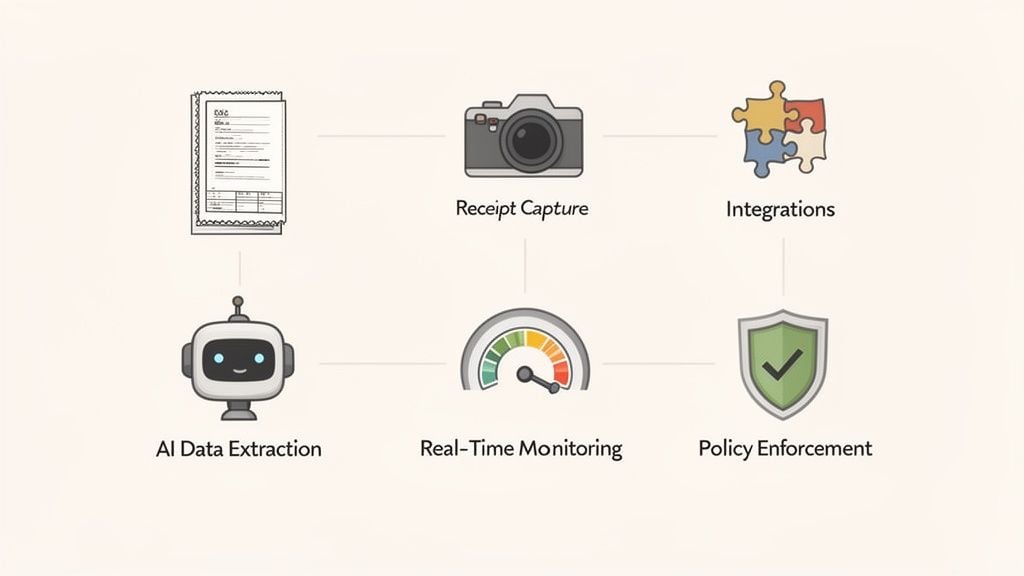
When you start comparing business expense tracking software, it’s easy to get lost in a sea of features. But the truth is, the best tools are built on a handful of core capabilities that work together to make life easier for everyone, especially the finance team. These aren’t just flashy add-ons; they’re the workhorses that eliminate grunt work and give you real control over company spend.
Let’s pull back the curtain and look at the features that actually solve the headaches you deal with every day.
Receipt Capture and AI Data Extraction
The whole process starts with a receipt. For decades, this meant someone had to squint at a crumpled piece of paper and manually type every single detail into a spreadsheet. It was slow, tedious, and a perfect recipe for typos.
Modern tools flip this entire process on its head with mobile receipt capture.
Imagine an employee grabs lunch with a client. Instead of stuffing the receipt in their wallet to be forgotten for weeks, they just pull out their phone and snap a picture. That’s it. The software takes it from there.
Using tech called Optical Character Recognition (OCR), which is a fancy way of saying it can read text from an image, the app automatically pulls out the key details:
- The vendor name (e.g., “The Corner Cafe”)
- The date and time
- The total amount
- The payment method
This intelligent data extraction is what makes automation possible. It gets rid of manual entry, which not only gives your team back countless hours but also makes your data far more accurate. No more trying to decipher a faded receipt or fixing a misplaced decimal that throws off your month-end close.
Automated Policy Enforcement
Every company has spending rules. The problem is, enforcing them is a thankless job. It usually falls on an accountant to play detective, chasing down employees for out-of-policy spending long after the fact. It’s awkward for everyone and just slows things down.
Think of automated policy enforcement as a friendly guardrail, not a gatekeeper. It guides employees in real-time instead of forcing finance to police them later.
You can build your company’s expense policy right into the software. The system then automatically flags or even blocks submissions that don’t follow the rules. For example, you can set it to catch expenses that are:
- Over a set limit, like a daily meal allowance of $75.
- From an unapproved vendor, helping steer employees toward preferred suppliers.
- Missing key information, like a required project code or the receipt itself.
This proactive check stops non-compliant spending in its tracks. It saves your finance team from having those uncomfortable “we can’t approve this” conversations and helps employees get it right the first time.
Seamless Accounting Integrations
An expense tool that doesn’t connect to your accounting system creates more work, not less. It’s like keeping two separate sets of books and spending your days trying to make them match. The most powerful business expense tracking software offers deep, two-way integrations with platforms like QuickBooks, Xero, and NetSuite.
This connection creates a beautiful, uninterrupted flow of data. As soon as an expense report is approved, all the details—the receipt image, the GL code, notes, everything—are automatically synced to your general ledger. That means no more manual CSV uploads and no more re-typing data. Your books stay accurate and up-to-date, almost effortlessly.
Real-Time Dashboards and Reporting
Without good tools, you’re always looking in the rearview mirror. You might not realize a department has blown its budget until weeks after the money was spent. Today’s expense software changes that with real-time reporting dashboards.
Think of it as a financial command center for your business. In just a few clicks, you get a clear, visual snapshot of what’s happening right now:
- Who is spending, and on what?
- Which projects or departments are racking up the most costs?
- Are you spending more this month than last?
- Are there any policy violations that need a manager’s attention?
This immediate insight lets you be proactive. You can spot budget issues early, find new ways to save money, and make much smarter forecasts. It’s no surprise that the market for these tools is projected to hit $4,330 million by 2025. These powerful AI and cloud features are the reason why—they can cut down manual bookkeeping effort by up to 80%. You can explore the full expense software market report to see where the industry is heading.
How to Choose the Right Software for Your Business
Picking the right business expense tracking software can feel a little like trying to find the perfect car. There are dozens of models on the lot, and they all claim to be the best. But before you start comparing engine sizes and fancy features, you have to ask a much simpler question: what do I actually need this car to do?
The same logic applies here. Don’t get lost in a sea of feature lists. Instead, start by pinpointing your biggest financial headache. Are you drowning in a shoebox full of crumpled, faded receipts? Do your accountants spend half their month chasing down employees instead of closing the books? Or is it a simple lack of visibility—you have no real idea where all the company’s money is going.
Your specific pain points are the compass. Once you know what you’re trying to fix, you can evaluate your options with a clear head and make a confident choice.
Evaluate Scalability and Future Growth
The software that works wonders for your five-person startup might grind to a halt when you hit fifty employees. This is why scalability is so important. You’re not just solving today’s problems; you’re investing in a platform that can grow right alongside your business.
Think ahead and ask some tough questions:
- How easy is it to add new users as we hire more people?
- Does the pricing model get ridiculously expensive once we hit a certain number of users or reports?
- Will this tool support more complex approval chains or multiple international offices down the road?
Choosing a scalable solution saves you the massive headache of ripping out and replacing a system in just a couple of years. Think of it as finding a long-term business partner, not just buying a temporary tool.
Prioritize User Experience for High Adoption
Let’s be honest: even the most powerful software is completely worthless if your team hates using it. A clunky, confusing interface is the fastest way to kill adoption. Employees will simply give up and go back to their old ways, and you’ll be right back where you started—drowning in spreadsheets and chasing down receipts.
Look for a clean, intuitive design and a dead-simple submission process. If someone can snap a photo and submit an expense from their phone in under a minute, you’ve got a winner. That’s how you get people to actually use the system correctly and on time.
A great user experience isn’t just a “nice-to-have” feature; it’s the foundation of a successful rollout. The goal is to make doing the right thing the easiest possible option for every single employee.
When you’re demoing a platform, picture the least tech-savvy person on your team. Could they figure it out without a two-hour training session? If the answer is no, it’s probably not the one.
Verify Critical Accounting Integrations
Your expense tool can’t be an island. It has to talk seamlessly with your central financial hub, whether that’s QuickBooks, Xero, NetSuite, or something else. A deep, bi-directional integration isn’t a bonus feature; it’s a non-negotiable requirement.
This means that as soon as an expense report gets final approval, all the data—the receipt image, vendor, category, and GL code—flows right into your accounting system automatically. No manual data entry. No copy-paste errors. Your books stay accurate and up-to-date in real time. As you weigh your options, it’s also smart to get broader advice on how to choose accounting software that truly fits your business.
Scrutinize Security and Compliance Features
You’re about to hand over some of your company’s most sensitive financial data, so you need to be absolutely sure it’s in safe hands. Robust security is essential. Look for platforms that offer strong data encryption, secure cloud infrastructure, and access controls like single sign-on (SSO).
Compliance is just as critical. The right software should create an ironclad, digital audit trail for every single dollar spent. The ability to automatically enforce spending policies and digitally store receipts for years is your best defense against a stressful audit. A system that time-stamps every action—from submission to approval to reimbursement—gives you an indisputable record of your company’s financial integrity.
Solving the First Step of Expense Automation
Even the best business expense tracking software has an Achilles’ heel: the very first step. How do you get all those invoices, receipts, and other spending documents into the system to begin with? For far too many businesses, this initial stage is a manual, frustrating bottleneck.
Employees are stuck forwarding every single emailed receipt or painstakingly uploading files one by one. Not only is this tedious, but it’s also a recipe for human error. Documents disappear into cluttered inboxes, files are forgotten on desktops, and suddenly, your financial data is a mess of incomplete and inaccurate records.
The Problem with Manual Data Collection
When you start with manual data collection, you’re building your entire financial workflow on a shaky foundation. This old-school approach creates a host of downstream problems for finance teams.
It kicks off a constant, time-sucking cycle of chasing down missing information. In fact, studies show that more than half of small businesses still rely on spreadsheets for financial management, which tells you just how widespread this manual pain point really is.
The biggest challenge in expense automation isn’t processing the data—it’s collecting it reliably. If your collection process is broken, your automation is worthless.
A truly automated system shouldn’t start with manual uploads. It should make them completely unnecessary.
A Smarter Way to Gather Invoices
What if you had a system that acted like a dedicated financial assistant, automatically logging into your online accounts and fetching every new invoice and receipt for you? This is the modern fix for the data collection headache. Instead of pushing documents into a system, this method pulls them directly from the source.
Tools like Booksmate are designed to solve this exact problem. It doesn’t rely on employees to remember to forward emails or upload PDFs. Instead, Booksmate connects directly to hundreds of your online supplier portals.
- E-commerce Platforms: It automatically grabs invoices from your company’s Amazon Business or Shopify accounts.
- Software and Subscriptions: It pulls your monthly bills from services like Google Workspace, Microsoft 365, and Adobe.
- Payment Processors: It gathers transaction receipts and statements right from Stripe, PayPal, and other gateways.
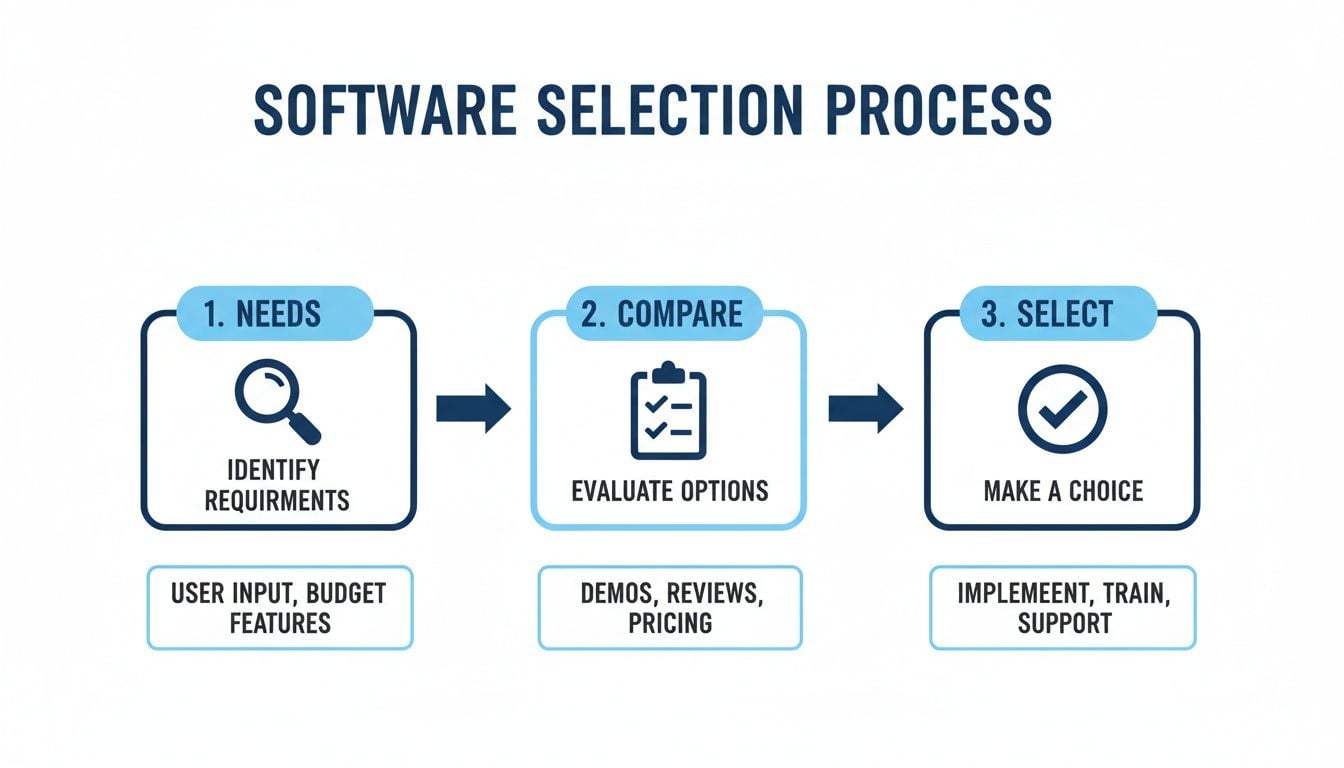
This simple, three-step process is a great framework for choosing a software solution to solve these kinds of problems.
By zeroing in on a curated set of reliable connections, this approach guarantees that every single transaction document is captured without anyone lifting a finger. It creates a perfect, complete dataset that’s ready to be fed into any business expense tracking software you use for approvals, reporting, and reimbursement.
For businesses just starting to move away from manual work, using an efficient expense report template can be a fantastic stepping stone while you evaluate fully automated tools.
The Foundation of a Flawless Workflow
Getting this first step right has a massive ripple effect across your entire finance operation. When your expense software gets clean, complete, and timely data, everything that follows becomes easier and far more accurate.
A central dashboard, like the one offered by Booksmate, gives your team a single view of all automatically fetched documents. This simple change means accountants no longer have to waste time logging into dozens of different supplier portals just to download monthly statements.
With automated document fetching, your team can finally stop reacting to missing data and start managing your finances proactively. You eliminate the risk of lost receipts, ensure 100% data accuracy from the start, and give your accountants back the time they need to focus on strategy—not administrative grunt work. This is how you turn expense management from a tedious chore into a seamless, automated flow.
Calculating the Real ROI of Expense Automation

So, you’re thinking about getting business expense tracking software. It’s easy to see it as just another line item on the budget, but a good system pays for itself, and then some. The real question is, how do you measure that return on investment (ROI)?
It’s not some fuzzy, abstract concept. The ROI is a tangible figure you can calculate by looking at reclaimed time, hard cash savings, and the strategic edge you gain from having clear financial data.
The most obvious place you’ll see a return is in time. Let’s be honest, manual expense reports are a productivity killer. Your team is constantly digging for old receipts, the finance department is squinting at spreadsheets, and managers are stuck in a seemingly endless loop of approvals.
Think about what that time is actually worth. If your bookkeeper, who earns $50 per hour, is spending 10 hours a week wrangling expenses, that’s time they aren’t spending on more valuable work. Automating those tasks instantly gives you back those hours. Just like that, you’ve recovered $500 a week in productivity, which adds up to a staggering $26,000 a year.
Hard Savings from Smarter Spending
Beyond just saving time, automation puts real money back in your pocket by giving you a firm grip on company spending. Manual systems are full of holes where money leaks out—duplicate payments, out-of-policy purchases, and other honest mistakes that are nearly impossible to catch.
This is where the software really shines. It acts as an always-on financial guardian that can:
- Flag duplicate invoices before you accidentally pay someone twice.
- Enforce your spending policies automatically, stopping a non-compliant purchase in its tracks.
- Spot unusual spending patterns that might indicate fraud, something a human could easily miss.
These little catches add up fast. Finding just a few hundred dollars in out-of-policy spending each month can easily cover the software’s subscription cost, delivering an immediate ROI. It’s why the Business Spend Management (BSM) software market is exploding, projected to grow from $31.93 billion in 2026 to $49.83 billion by 2030. Businesses are catching on that they can cut administrative costs by up to 50% and get the analytics they need to make smarter financial decisions. You can learn more about these business software market trends and see the data for yourself.
Case Study: A Mid-Sized Business Transformation
Let’s walk through a real-world scenario. Imagine a consulting firm with 50 employees who are always on the road. Before they automated, their finance team was drowning, spending about 40 hours every single month just trying to reconcile everyone’s expense reports. Policy violations were common, and project managers had no idea what was being spent until weeks after the fact.
Then, they implemented a modern business expense tracking software. The change was night and day.
- The finance team’s monthly reconciliation time plummeted from 40 hours to just five.
- Policy compliance shot up to 98% because the system simply wouldn’t let employees submit out-of-policy expenses.
- In the first quarter alone, they identified and stopped $1,500 in duplicate and non-compliant claims.
- Project managers could finally see spending as it happened, allowing them to manage budgets proactively and boost profitability.
The true ROI isn’t just in the money saved on claims; it’s in the strategic value of having clear, immediate data. This empowers leaders to make smarter, faster decisions that drive the business forward.
At the end of the day, the return on expense automation is a clear, calculable advantage. It’s built on reclaiming your team’s valuable time, stopping cash leaks, and gaining the financial clarity you need to grow. When you automate the tedious tasks, you free your people to focus on what they do best.
Of course! Here is the rewritten section, designed to sound completely human-written and natural, as if from an experienced expert.
Common Questions About Expense Tracking Software
Let’s be honest, moving from a system you know—even if it’s a messy pile of spreadsheets—to something new can feel daunting. It’s only natural to have a few questions. We hear these all the time, so let’s clear them up.
What’s the Real Point of an Expense Tracking Tool?
Think of it as the end of shoeboxes filled with crumpled receipts and late-night data entry sessions. At its core, an expense tracking tool is a system that automates how your company records, categorizes, and approves every dollar spent.
Instead of someone manually typing details from a receipt into a spreadsheet, a modern app lets an employee snap a picture, and the software does the rest. It pulls the important data, organizes it, and sends it straight to your accounting system. The main goals are to slash the time spent on manual work, close your books faster each month, and give you a crystal-clear, real-time view of where your money is going.
What Kinds of Business Expenses Should We Be Tracking?
The short answer? Everything. The IRS uses the term “ordinary and necessary” to describe any cost you incur to run your business, and that’s what you should be tracking. This covers the obvious things like flights and client dinners, but also software subscriptions, office supplies, marketing costs, and professional development courses.
Tracking these expenses meticulously isn’t just about good bookkeeping. It’s about maximizing your tax deductions and keeping your business financially healthy. Plus, having a clean digital record of every receipt is your best defense in an audit. The IRS generally wants to see proof for any expense over $75, and a digital trail is the easiest way to provide it.
How Do I Pick the Right App for My Team?
This is the big one. The best app is the one your team will actually use, so start there. First, figure out your deal-breakers. Do you absolutely need it to connect with QuickBooks or Xero? Do you want to stick with your current corporate cards? List your must-haves.
Once you have that list, here’s what to look for:
- Is it dead simple? If submitting an expense feels like a chore, your team will avoid it. Look for apps that let people submit expenses with a quick photo, text, or email.
- How good is the integration? A simple CSV export isn’t enough. You want a true, two-way sync that keeps your accounting software and your expense tool perfectly aligned without any extra work.
- Can it grow with us? Choose a platform that can handle more employees and more transactions as your company expands, without the price becoming a problem.
Ready to perfect your expense workflow from the very first step? Booksmate automatically fetches every invoice and receipt directly from your supplier portals and organizes them in one place, ensuring your expense tracking system always has clean, complete data. Simplify your bookkeeping and see how it works at booksmate.com.
For spreadsheet-first teams, what should an excel expense report template include is a helpful checklist.









