Last updated: 2026-10-26
How to Download a ChatGPT Invoice: Plus, Pro, and Business
To download a ChatGPT invoice for a plan bought on the web, open Settings, then Billing, then Invoices, and select View. ChatGPT and the OpenAI API are billed separately, so an API invoice is not in that list. The steps below are the manual path, including a company name or VAT number and where emailed receipts go.
How to download a ChatGPT invoice
For ChatGPT Go, Plus, or Pro bought on the web, open ChatGPT, then Settings, then Billing, and find Invoices. Select View beside the invoice. Select View all for older ones. OpenAI says ChatGPT and the API platform are billed separately.
- Sign in to the account that pays for the plan. If Invoices is missing, OpenAI says to try the same account in another browser.
- If you see Payment under Account instead of Billing, select Manage. That opens the billing portal, where Invoice History lists copies you can download.
- A plan bought in the Apple App Store or on Google Play does not appear in this list.
ChatGPT billing history and receipts
Billing history for a web subscription is the Invoices list under Settings, then Billing, or Invoice History after you select Manage. Each row is one charge. Open it to see the invoice. OpenAI's help describes opening one invoice at a time. It does not describe one file that contains every month.
- A monthly plan bills again on the same day each month. OpenAI says that date cannot be changed. An example in the help: subscribe on the 12th and the next invoice is on the 12th.
- Work down the list for the months you still need for monthly bookkeeping.
- The receipt proves the payment. The invoice is the document with the billing details. Download the invoice copy from that history when you need it for your books.
ChatGPT Business and Team invoices
ChatGPT Business invoices are under Workspace settings, then Billing, then Invoices. OpenAI says only a workspace owner can view invoices. If you still call the plan Team, use this Business workspace path: the current billing help is written for ChatGPT Business.
- Owners can also select Manage plan, then Payment method, to open the billing portal and see past invoices.
- Admins who are not owners can open Billing on some workspaces, but OpenAI says only owners can view invoices.
- Self-serve Business workspaces pay by card. OpenAI says invoice billing, bank transfer, and net terms are not available there. A contracted Enterprise or Edu plan is a separate agreement.
- If you are an owner and Billing will not open, contact OpenAI Support with the account email, workspace name or ID, the months you need, and any invoice number you already have.
- OpenAI Help: ChatGPT Business billing
- OpenAI Help: ChatGPT and API billing
- OpenAI Help: finding past ChatGPT invoices
OpenAI API invoices
API charges are not on the ChatGPT invoice. OpenAI says to manage each product in its own billing settings. Enterprise API customers download invoices from the Billing section of the API Platform. Other API customers see payment history and any invoices or receipts in Billing history.
- Enterprise API invoices cover a calendar month of usage, unless a written agreement says otherwise, and are typically issued within two weeks after the month ends.
- Individual and team API use is paid with prepaid credits or automatic card charges. Those charges show in Billing history, not in ChatGPT Settings.
- Someone who can manage billing for the API organization updates billing details, including the Tax ID, in the organization's billing preferences.
How to add a company name or VAT number
On an individual ChatGPT plan, open Settings, then Billing, then Billing information, and select Edit. Add your billing name (the company name you want on the invoice) and your Tax ID or VAT ID, then select Save. OpenAI says this changes future invoices only.
- On ChatGPT Business, an owner opens Workspace settings, then Billing, then Settings, then Edit, and saves the billing name and Tax ID there.
- If you see Payment under Account, select Manage, then Update information under Billing information.
- An invoice that was already issued is not revised in these settings. You can ask OpenAI Support to review a reissue. Include the invoice number, what is wrong, and the billing name, address, and Tax ID or VAT ID you want. A reissue is not guaranteed.
- OpenAI says an invalid Tax ID can be removed and tax can still be charged.
Where ChatGPT emailed receipts go
For a plan bought on the web, OpenAI tells you to open Settings, then Billing, then Invoices. That help does not describe an emailed PDF. Your billing email can be different from the email you use to sign in to ChatGPT.
- If Invoices is empty, confirm you are in the paying account, then check whether Apple or Google billed you.
- Apple emails a receipt to the Apple Account that paid, each time the subscription renews. That address can differ from your ChatGPT email. On an iPhone, open the App Store, select your photo, then Apps and Purchase History, then Purchase History.
- Google sends purchase confirmations to the Google account that paid. In the Play Store app, open your profile, then Payments and subscriptions, then Budget and history.
- API receipts and invoices stay in API Billing history. They are not mailed to your ChatGPT inbox by the steps in the ChatGPT help.
- OpenAI Help: finding past ChatGPT invoices
- OpenAI Help: Apple App Store receipts
- OpenAI Help: billing name, Tax ID, and VAT ID
Download ChatGPT invoices automatically
Booksmate downloads ChatGPT invoices from your own account, on your own computer, and saves each one as a PDF. ChatGPT is only the vendor portal. Booksmate does not use ChatGPT to do this.
- Press Fetch All when you do monthly bookkeeping and the new ChatGPT invoice is saved with the rest.
- The same app collects invoices from 500+ integrations and your email inbox.
- Send the PDFs to Xero or QuickBooks, or keep them on your computer.
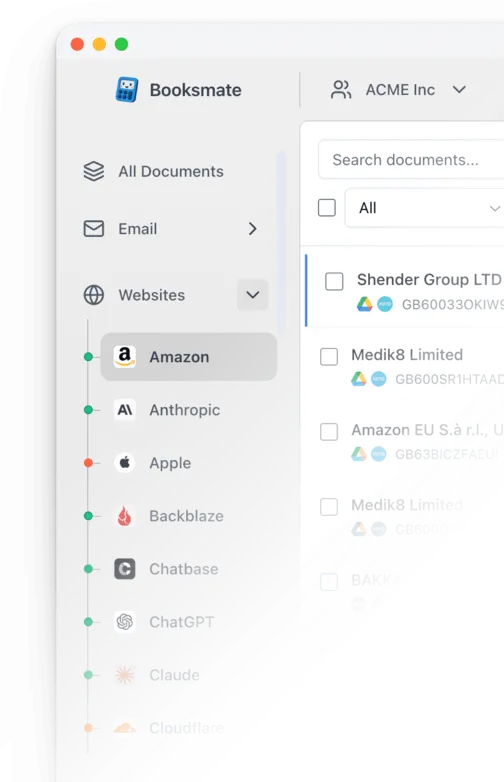
Automatically download ChatGPT invoices
Booksmate downloads ChatGPT invoices automatically in seconds. Add ChatGPT in Booksmate, press Fetch All, and every invoice is downloaded for you without manual login.
-
Add
ChatGPT inside Booksmate.
- Press Fetch All and log in to your ChatGPT account.
- Done! Your invoices are automatically downloaded for you.
Start collecting ChatGPT invoices automatically
Booksmate downloads your ChatGPT invoices and saves them as PDFs, so you never log in manually again.
Sign up for Booksmate
Add ChatGPT inside Booksmate
Press Fetch All and Booksmate downloads your invoices
No risk. Cancel anytime.
Manually download ChatGPT invoices
- On chatgpt.com , select your profile, then Settings, then Billing
- Under Invoices, select View beside the charge. Select View all for older invoices
- If you see Payment under Account instead, select Manage, then download the copy from Invoice History
- Workspace owners open Workspace settings, then Billing, then Invoices. Only owners can view invoices
- API charges are separate. Enterprise invoices are in the Billing section of the API Platform . Other API customers use Billing history
Important details
- Go, Plus, and Pro: Settings, then Billing, then Invoices
- Business: only a workspace owner can view invoices
- API invoices are on the API Platform, not in ChatGPT
- App Store and Google Play email their own receipt
ChatGPT Invoice FAQs
Is it safe to use Booksmate with ChatGPT?
Yes. Booksmate runs on your own computer and never stores your ChatGPT password, so your login details are not shared with any third party.
Can I download old invoices?
Yes. When you first add ChatGPT to Booksmate, Booksmate downloads the full invoice history that is available in your ChatGPT account.
Does Booksmate support email invoice collection?
Yes. Booksmate gathers invoices from your email inbox in addition to web portals like ChatGPT, giving you one complete invoice collection setup.
Can I download all my ChatGPT invoices at once?
Yes. Booksmate downloads your complete ChatGPT invoice history automatically. Add ChatGPT, press Fetch All, and every available invoice is saved to your computer.
Are ChatGPT invoices saved as PDF files?
Yes. Booksmate saves every invoice as a PDF, so they are easy to organize, share, or upload to your accounting software.
Where is my ChatGPT billing history?
For Go, Plus, or Pro bought on the web, open Settings, then Billing, then Invoices. Select View, or View all for older invoices. If you see Payment under Account, select Manage and use Invoice History in the billing portal.
How do I download a ChatGPT receipt?
Open the same Invoices list or Invoice History and download the copy shown for that charge. OpenAI's help describes viewing and downloading the invoice from that history. A plan bought from Apple or Google uses the store receipt instead.
I pay for ChatGPT through the App Store or Google Play. Where is my invoice?
It is not in ChatGPT. Apple or Google bills you. Apple emails a receipt to the Apple Account that paid, which may differ from your ChatGPT email, and the charge is in that account's purchase history. Google sends a purchase confirmation to the Google account that paid. Check Budget and history in the Play Store.
Is the ChatGPT invoice the same as my OpenAI API invoice?
No. OpenAI says ChatGPT and the API platform have separate billing. API invoices for Enterprise customers are in the Billing section of the API Platform. Other API customers use Billing history for payment history and receipts.
Where are ChatGPT Team or Business invoices?
Open Workspace settings, then Billing, then Invoices. OpenAI says only a workspace owner can view them. The current billing help calls this plan ChatGPT Business. If Billing will not open, an owner can ask OpenAI Support and should include the workspace name and the months needed.
How do I add a company name or VAT number to a ChatGPT invoice?
Open Settings, then Billing, then Billing information, and select Edit. Add your billing name and your Tax ID or VAT ID, then Save. Business owners use Workspace settings, then Billing, then Settings, then Edit. OpenAI says this applies to future invoices only. A reissue of an old invoice is not guaranteed.
Where do emailed ChatGPT receipts go?
Web invoices are in Settings, then Billing, then Invoices. OpenAI does not describe emailing that PDF. Your billing email can differ from your sign-in email. Apple emails its receipt to the Apple Account that paid. Google sends purchase confirmations to the Google account that paid.
Why is my ChatGPT invoice list empty?
You are usually in a different account or workspace from the one that pays, or the plan was bought through Apple or Google. Switch accounts, check the store receipt, then try another browser. If it is still empty, contact OpenAI Support with your account email.
Can I download every ChatGPT invoice at once?
OpenAI's help lists each charge and you open them one at a time. It does not describe one file that contains every month. For monthly bookkeeping, Booksmate can collect the ChatGPT invoice from your account so you do not repeat the clicks.