UPS Invoice Lookup: Your Quick Guide to Finding Bills
Struggling with a UPS invoice lookup? Our step-by-step guide shows you how to find, download, and manage your UPS bills using every available method.

You're usually not looking for a UPS invoice out of curiosity. You need it because monthly bookkeeping is due, a charge needs to be checked, or someone in the company swears they paid it already. Then you open the UPS billing portal and run into the part nobody warns you about. It wants invoice details you don't have yet.
That's why UPS invoice lookup feels harder than it should. The search itself isn't the first problem. Access is. If you're not already enrolled in the UPS Billing Center, the key hurdle is getting through that first gate without getting blocked by missing or mismatched invoice data.
Table of Contents
- Why Is a UPS Invoice So Hard to FindThe cold-start problem
- Why this trips up good accounting teams
- Using the UPS Billing Center for Invoice LookupsStart with enrollment, not search
- What to do inside the Billing Center
- Why the Control ID matters
- Alternative Ways to Get Your UPS InvoiceWhen email is the fastest option
- A practical comparison of your options
- Troubleshooting Common Invoice Lookup ProblemsThe most common failure is bad field matching
- What to do when the lookup still fails
- Beyond Manual Lookups Automate UPS InvoicesWhy manual retrieval breaks down
- What a better workflow looks like
- Your Checklist for Smarter UPS Bill ManagementA simple operating routine
Why Is a UPS Invoice So Hard to Find
The hard part usually starts with a missing bill and a deadline. You're reconciling shipping expenses, one invoice is absent, and the portal asks for an invoice number to enroll or verify access. That's the accounting version of being asked for the key that's locked inside the room.
UPS built the process this way for security, but it creates a real operational headache. UPS says first-time enrollment requires a recent invoice from the last 45 days, typically one of the last three billed, plus exact values for Account Number, Invoice Number, Invoice Date, Amount Due, and Control ID as described on the UPS billing enrollment page. That's why many people aren't stuck on search. They're stuck on enrollment.
The cold-start problem
This comes up all the time in bookkeeping handoffs. A business owner used to receive the invoices. Then the controller leaves, a shared mailbox gets changed, or a shipping manager had the only working login. The company still has an active UPS account, but the person who now needs the records can't get in cleanly.
That creates a bad loop:
- You need the invoice to enroll
- You need enrollment to search old invoices
- You can't move forward if one field is entered differently from the original invoice
Practical rule: If you're locked out of UPS billing, stop trying random searches. Find the most recent original invoice document first, then use that document as your source of truth for every field.
A lot of finance people assume billing portals work like a bank statement archive. Log in, pick a date range, download what you need. UPS can work that way once access is established, but at the front door it behaves more like an identity check tied to invoice metadata.
That matters because manual memory isn't reliable enough here. “Close enough” doesn't work. If the PDF says one format and you type another, enrollment can fail. If the amount due includes formatting you overlooked, you can get blocked. The frustration is normal. The system is strict by design.
Using the UPS Billing Center for Invoice Lookups
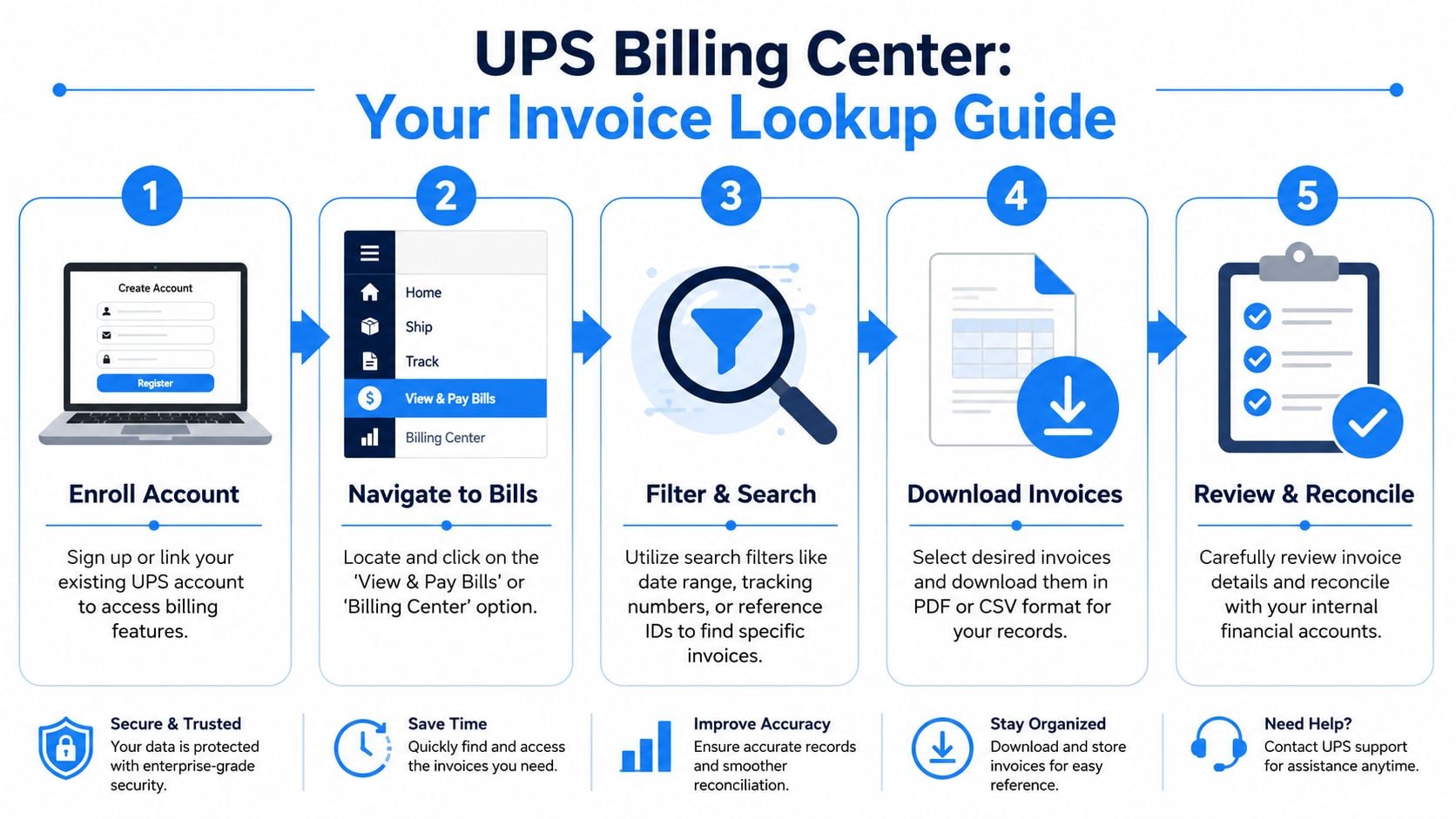
The UPS Billing Center is the official place to manage invoices, disputes, reports, and payments. Once you're in, it's the most complete self-service option. UPS states in its Billing Center user guide that enrolled users can access and download invoices for up to 56 weeks from the issue date, which is roughly 13 months, and can view them in online, PDF, CSV, and XML formats.
Start with enrollment, not search
If you already have a recent invoice in hand, use it as your setup document. Don't type from memory, and don't rekey from a screenshot if you can avoid it. Work from the actual PDF or paper invoice.
A clean setup usually looks like this:
- Open one recent UPS invoice and keep it visible while enrolling.
- Enter each field exactly as shown on that invoice.
- Link the correct shipping account to the Billing Center profile.
- Finish enrollment before trying historical searches.
The key mistake is trying to rush the login stage. People often bounce between accounts, browsers, and old credentials, then assume the portal is down. More often, the account just isn't properly enrolled for billing access.
Later in the workflow, this video gives a helpful visual overview of the portal experience:
Once enrolled, the portal becomes much more usable. The invoice area is built for repeat retrieval, not one-off hunting. In practice, that means you should treat it like a records workspace rather than a place to glance at one bill and leave.
Look for these functions when doing a UPS invoice lookup:
- Search and filters: Narrow by date, invoice details, or status instead of scrolling through the entire list.
- Sortable invoice table: This helps when you're trying to isolate a billing period or compare several invoices side by side.
- Multiple export formats: PDF is best for records and support issues. CSV is useful for reconciliation. XML can matter for selected accounts with structured billing workflows.
One detail many people miss is the Control ID. A UPS invoice includes a nine-digit Control ID that uniquely identifies that invoice, and invoice guides note that it appears in the top-right area of the invoice or in the invoice header in the Billing Center, as explained in this UPS invoice and Control ID guide.
That number is often more useful than people expect. The account number stays the same across invoices. The Control ID points to the specific bill.
If you're saving UPS invoices locally, include the invoice date and the Control ID in your filename. It makes later support calls and dispute reviews much easier.
For day-to-day bookkeeping, the best workflow is simple. Enroll carefully, search with filters instead of scrolling, and download the invoice immediately in the format you need. Don't count on “I'll come back for it later.”
Alternative Ways to Get Your UPS Invoice
When the Billing Center isn't available, don't freeze. There are still workable paths to get the document or at least the information needed to recover it. The fastest option depends on whether you need one invoice right now or a more reliable retrieval process going forward.
When email is the fastest option
The first place I'd check is the business inbox. Search the shared AP mailbox, the owner's inbox, and any shipping or operations mailbox that might receive UPS notifications. In a lot of companies, the invoice exists already, but it landed in the wrong email account months ago.
If you find a PDF copy, look at the top-right area for the nine-digit Control ID. That identifier is especially useful when you're working through support or any one-off lookup path because it points to the exact invoice, not just the account.
Another option is using a document capture workflow that pulls invoices from inboxes instead of relying only on portal logins. For businesses trying to centralize those records, invoice and receipt extraction workflows can reduce the scramble that happens when billing emails are scattered across staff accounts.
Here's the trade-off view I'd use in real work.
Method
Best For
Pros
Cons
Email inbox search
One missing invoice when you suspect it was already delivered
Fast, no portal access needed, may reveal the original PDF
Only works if the right mailbox received it and nobody deleted or misfiled it
Guest lookup or one-off invoice viewer
Single-invoice recovery when you have strong identifying details
Helpful for isolated cases, avoids full account setup in some situations
You still need precise invoice information and verification data
UPS customer service
Cases involving account access issues, missing enrollments, or reprint requests
Useful when portal access is blocked and internal records are incomplete
Slower, and the call goes better if you already have account details and the Control ID ready
UPS Billing Center
Ongoing billing management and invoice history
Best official long-term method, organized retrieval, download options
Requires proper enrollment before it becomes easy
Bring the exact invoice identifiers you do have before contacting support. An account number alone often won't be enough to resolve the issue quickly.
The practical lesson is this. If you need a single invoice today, start with email. If you need repeat access and cleaner monthly bookkeeping work, fix portal access as soon as you can.
Troubleshooting Common Invoice Lookup Problems
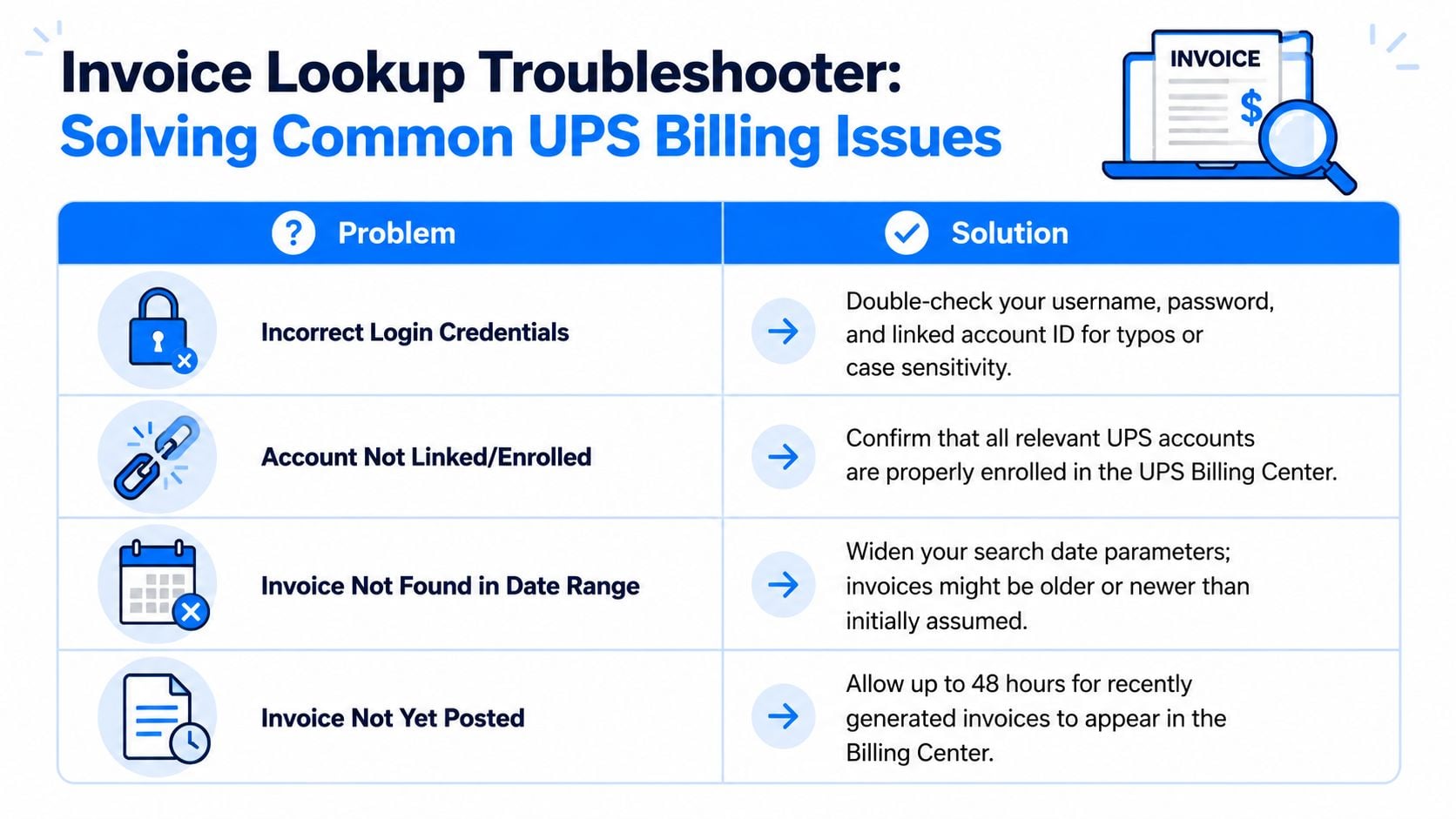
Most UPS invoice lookup failures aren't random. They come from a small set of predictable issues, and the biggest one is bad field matching. UPS states that enrollment reliability depends on entering Account Number, Invoice Number, Invoice Date, Amount Due, and Control ID exactly as shown on an invoice that's no older than 45 days on the UPS billing guidance page.
The most common failure is bad field matching
In these scenarios, automation attempts and manual entry both go wrong. A person types the amount due from memory. OCR reads one character incorrectly. Someone uses an older invoice that looks similar but isn't recent enough. The system rejects the attempt, and it feels like the portal is broken.
Use this quick diagnosis list:
- Enrollment fails immediately: Check whether the invoice used for setup is recent enough and belongs to the correct shipping account.
- “Invoice not found” appears: Compare every field to the original invoice header, character by character.
- Repeated lockouts or mismatches: Stop retyping. Open the source invoice on one screen and enter values directly from it.
Field check rule: Treat the invoice header as the authority. If your spreadsheet, email note, or OCR result conflicts with the PDF, trust the invoice PDF.
Some problems aren't typing errors. They're process issues inside the company.
For example:
- The wrong person owns billing access: Ask who originally enrolled the account. In many businesses, a former employee or operations lead still controls the billing profile.
- You're using the wrong invoice for verification: Pull the most recent billing document available rather than the one you happen to be reconciling.
- The account is active but records are scattered: Check shared inboxes, paper files, and exported PDFs before trying support.
A practical habit that saves time is keeping one “known good” UPS invoice in your accounting procedures folder. Not for posting. For access recovery. When the portal asks for exact values, you won't be rebuilding the answer from scratch.
Beyond Manual Lookups Automate UPS Invoices
Manual UPS invoice retrieval works when volume is low and the same person handles billing every month. It starts falling apart when invoices go to different inboxes, billing access sits with one staff member, or the finance team needs consistent records without chasing them down.
Why manual retrieval breaks down
The problem isn't only the portal. It's the repetition around it. Someone has to remember when invoices are posted, log in, find the right files, save them consistently, and put them where accounting can use them. If that chain breaks, monthly bookkeeping gets messier than it needs to be.
Manual lookups also create avoidable inconsistency:
- Files get saved under different names
- One account gets checked while another is missed
- The PDF exists, but nobody extracted the key fields
- Support becomes harder because records aren't organized
A better setup pulls invoices into one controlled place, keeps the original documents attached, and extracts the fields your accounting team needs for reconciliation and posting. That's especially useful when UPS is only one of many vendor portals the team has to monitor.
If your process is still built around logging in and downloading one file at a time, it's worth looking at automatic invoice download workflows. The main benefit isn't convenience. It's consistency. You stop relying on memory and start building a repeatable billing record.
Your Checklist for Smarter UPS Bill Management
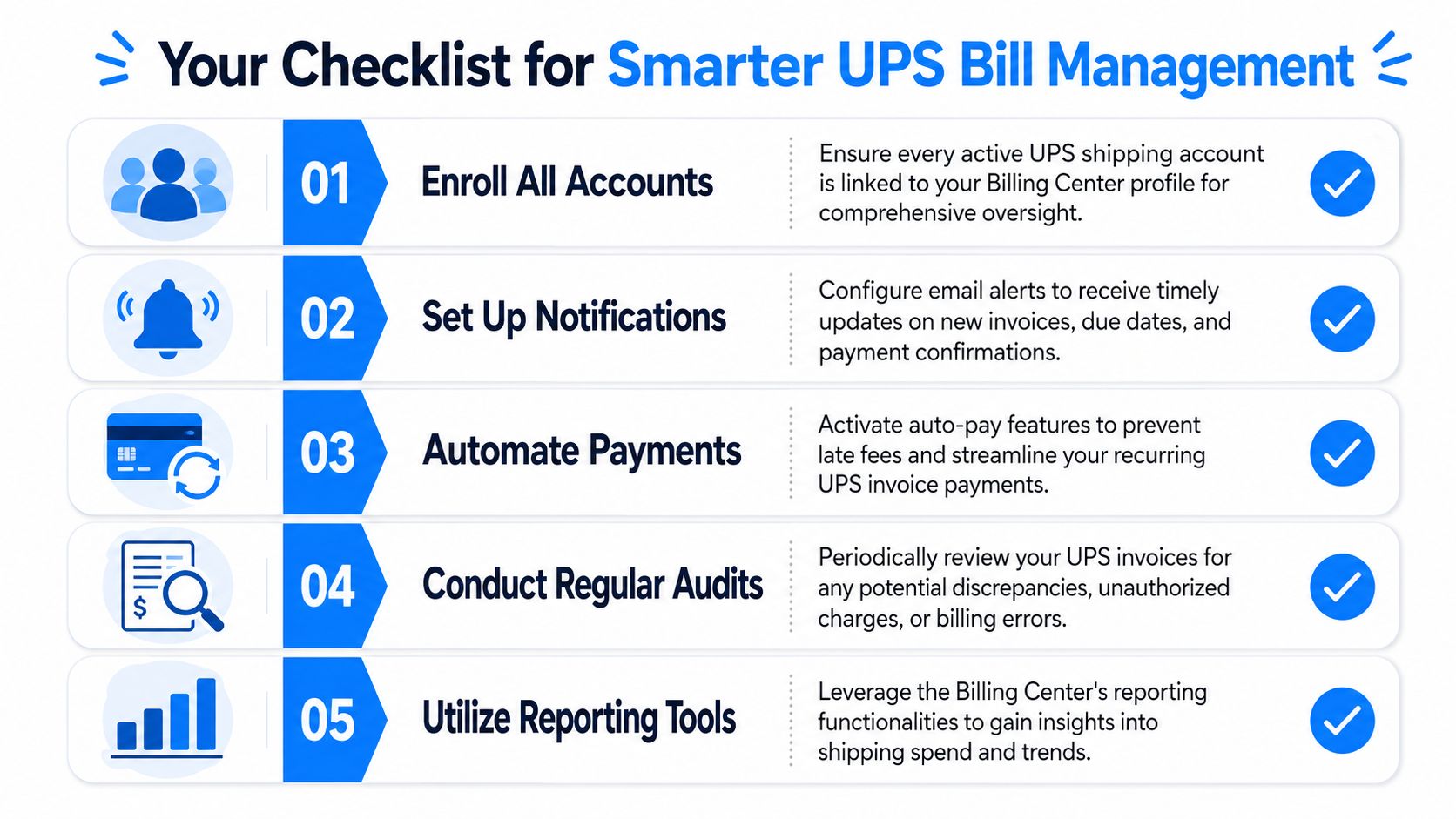
Good UPS billing habits aren't complicated. They just need to be deliberate. The easiest teams to work with are the ones that don't wait for a missing invoice to discover who has portal access, where PDFs are stored, or which inbox gets the billing emails.
A simple operating routine
Use this as your baseline process:
- Keep one recent UPS invoice accessible: It helps with billing access recovery and support verification.
- Store downloaded invoices in one standard location: Shared drive, document system, or AP repository. Pick one.
- Name files consistently: Include the vendor, invoice date, and invoice identifier so later searches are easy.
- Review billing ownership: Make sure the current finance or operations team can access the right account.
- Separate retrieval from reconciliation: First get the document. Then review the charge. Mixing those steps slows both.
For finance teams that are tightening broader back-office processes, it also helps to learn from adjacent cost-control work. If your business is reviewing technical spend, contractor activity, or innovation-related costs, you may also want to discover R&D Tax Incentive strategies that improve how supporting records are gathered and defended.
One more practical habit matters. Keep your expense records connected, not scattered. If your team needs a better operating rhythm across shipping, software, and vendor bills, this guide on how to keep track of business expenses is worth applying alongside your UPS process.
The goal isn't just to get one invoice. It's to stop losing time to the same billing chase every month.
How to do a UPS invoice lookup
How to do a UPS invoice lookup: find a recent UPS invoice, enroll in the UPS Billing Center with the fields printed on that invoice, then search and download the PDF.
- Search the AP, owner, and shipping inboxes for an existing UPS invoice PDF.
- If you are not enrolled, use an invoice from the last 45 days, typically one of the last three billed, on the UPS billing enrollment page.
- Enter Account Number, Invoice Number, Invoice Date, Amount Due, and Control ID exactly as printed on that UPS invoice.
- After enrollment, open the Billing Center invoice list and filter by date or invoice details.
- Download the UPS invoice as PDF for the books. Use CSV when you need a reconciliation file.
- Name the file with the vendor, invoice date, and the nine-digit Control ID.
The Control ID is in the top-right of the UPS invoice or in the Billing Center header. It identifies that bill. The account number stays the same across invoices.
FAQ: UPS invoice lookup
Where do I look up a UPS invoice?
The official place is the UPS Billing Center after you are enrolled. You can search, filter, and download invoices there in PDF, CSV, or XML. If you are not enrolled yet, start with a UPS invoice PDF already in email, because enrollment asks for fields from that document.
What do I need to enroll in the UPS Billing Center?
UPS asks for a recent invoice, usually from the last 45 days and one of the last three billed. Type Account Number, Invoice Number, Invoice Date, Amount Due, and Control ID exactly as shown on that UPS invoice. Close enough values fail the check.
What is a UPS Control ID?
A UPS Control ID is the nine-digit number that identifies one invoice. It appears in the top-right of the UPS invoice or in the invoice header inside the Billing Center. The shipping account number does not change from bill to bill, so support and filing work better when you keep the Control ID in the file name.
How far back can I download UPS invoices?
UPS says enrolled Billing Center users can access and download invoices for up to 56 weeks from the issue date, about 13 months, in online, PDF, CSV, and XML formats. That window starts after enrollment works. It does not replace the recent-invoice check required to enroll.
What if UPS invoice lookup says the invoice was not found?
Stop retyping from memory. Open the UPS invoice PDF and match Account Number, Invoice Number, Invoice Date, Amount Due, and Control ID character by character. Use a recent invoice for the correct shipping account. If portal access is blocked, contact UPS support with the account number and Control ID rather than guessing fields.
If you're tired of logging into portals and downloading invoices one by one, Booksmate helps collect invoices and receipts automatically, organize them in one dashboard, and prepare them for accounting export. It's a practical option for bookkeepers and finance teams who want fewer billing portal headaches.









